

Free Make an Offer Plugin for WooCommerce
Codiffy Make an Offer is a free WooCommerce plugin that lets customers name their price: you accept, decline or send a counter-offer, and the agreed price applies only in that customer's cart. It is for second-hand and vintage shops, collectibles, wholesale and B2B stores, furniture, equipment and end-of-line stock.
FreeOn WordPress.org
- Free download on WordPress.org
- Built and supported by Codiffy
- For WordPress with WooCommerce
What it does
Make an offer button
On product pages in classic and block themes, and optionally in shop and category lists
Choose where offers are allowed
All products, or selected products and categories, with exclusions and a minimum price
Accept, decline or counter
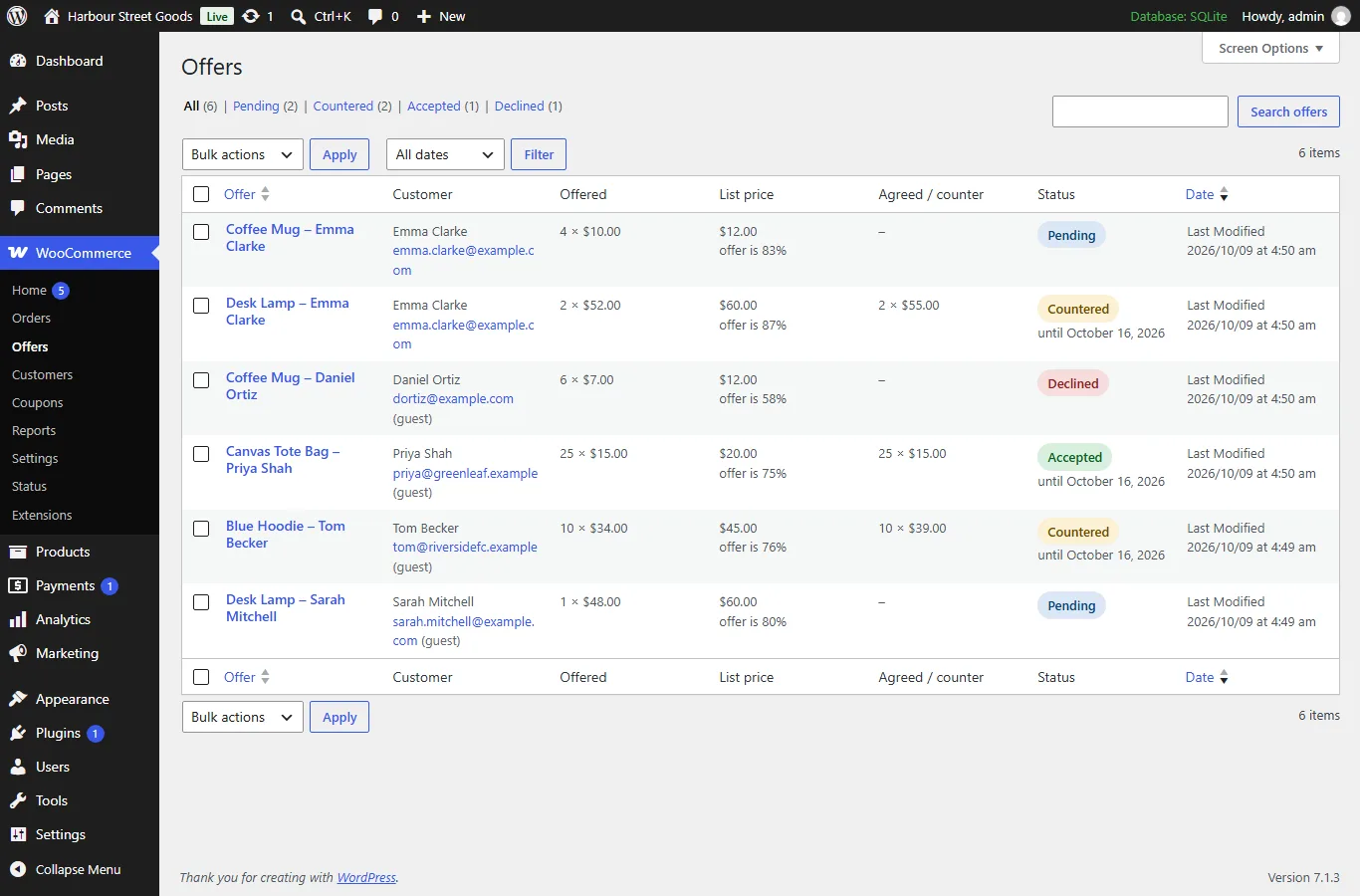
WooCommerce > Offers lists every offer; reply with a decision, a reason or a new price and quantity
Personal agreed price
Only in that customer's cart, for the agreed quantity, until it expires, and only once
Low offers declined at once
Set a minimum offer as a percentage of the price
Emails and secure links
Every step emailed in your WooCommerce email style; customers act from the link without an account
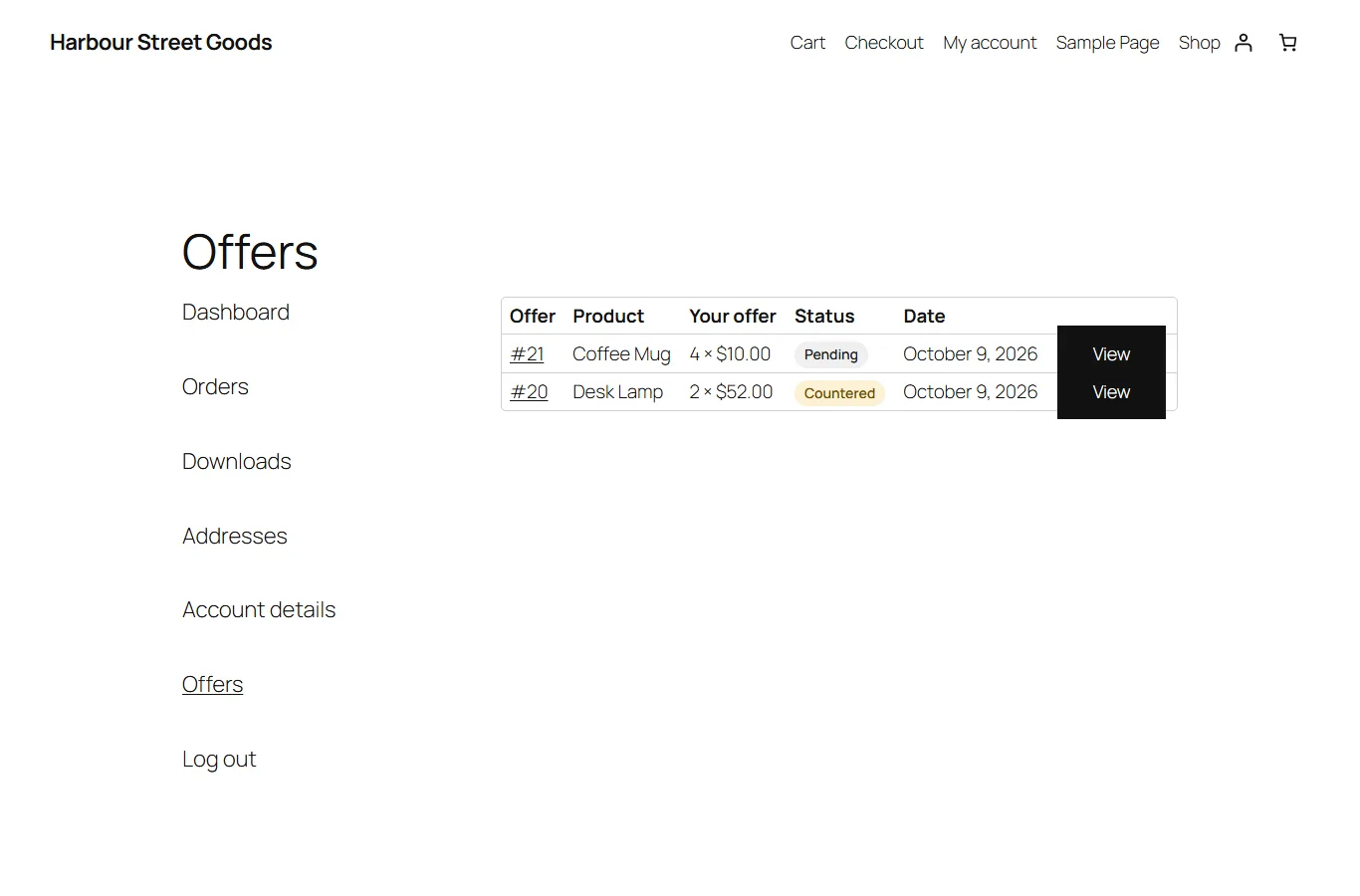
My Account > Offers
Logged-in customers see their own offers
Spam and privacy
A nonce, a honeypot, 5 offers per hour per visitor, and personal data export and erase
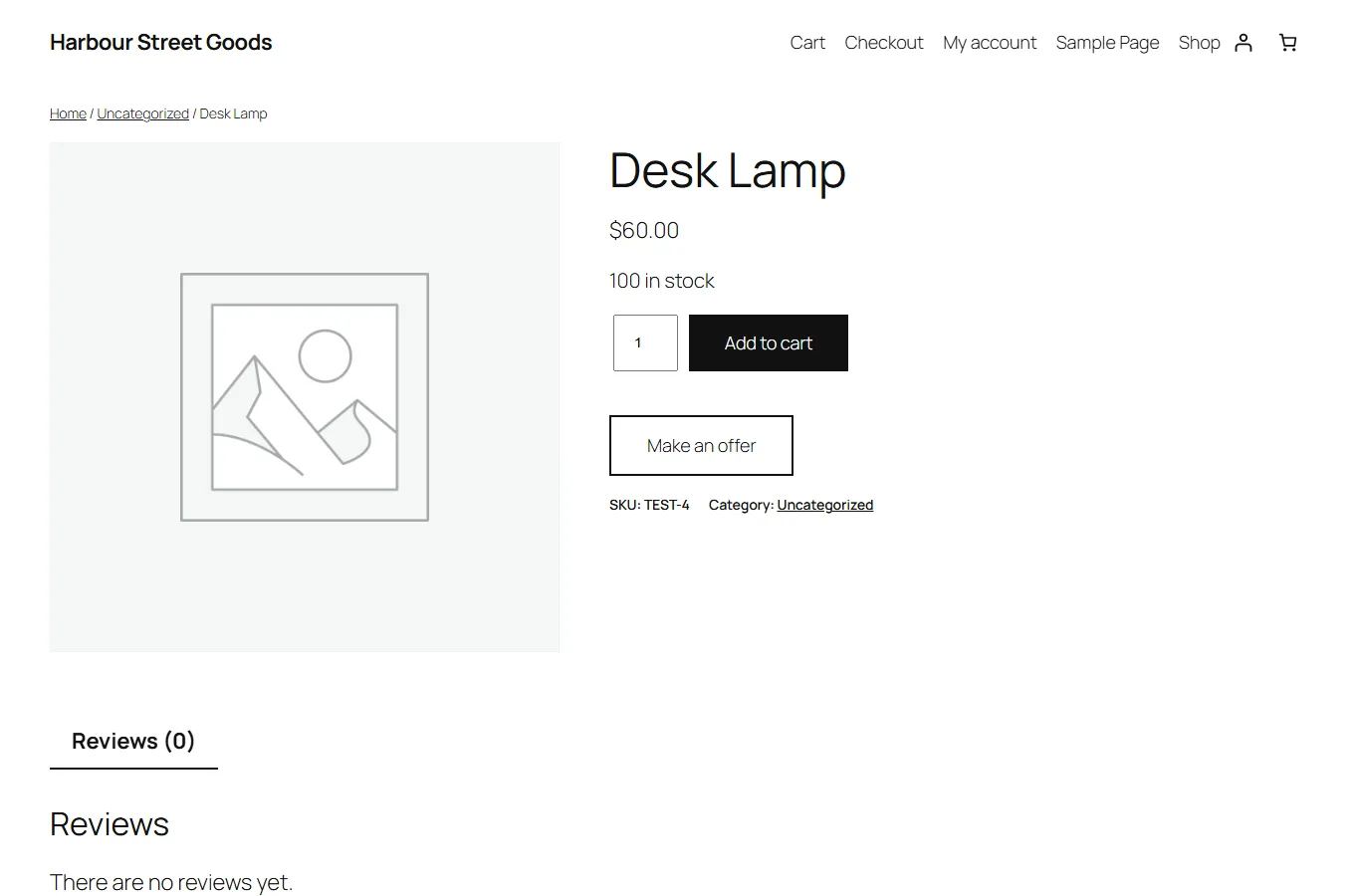
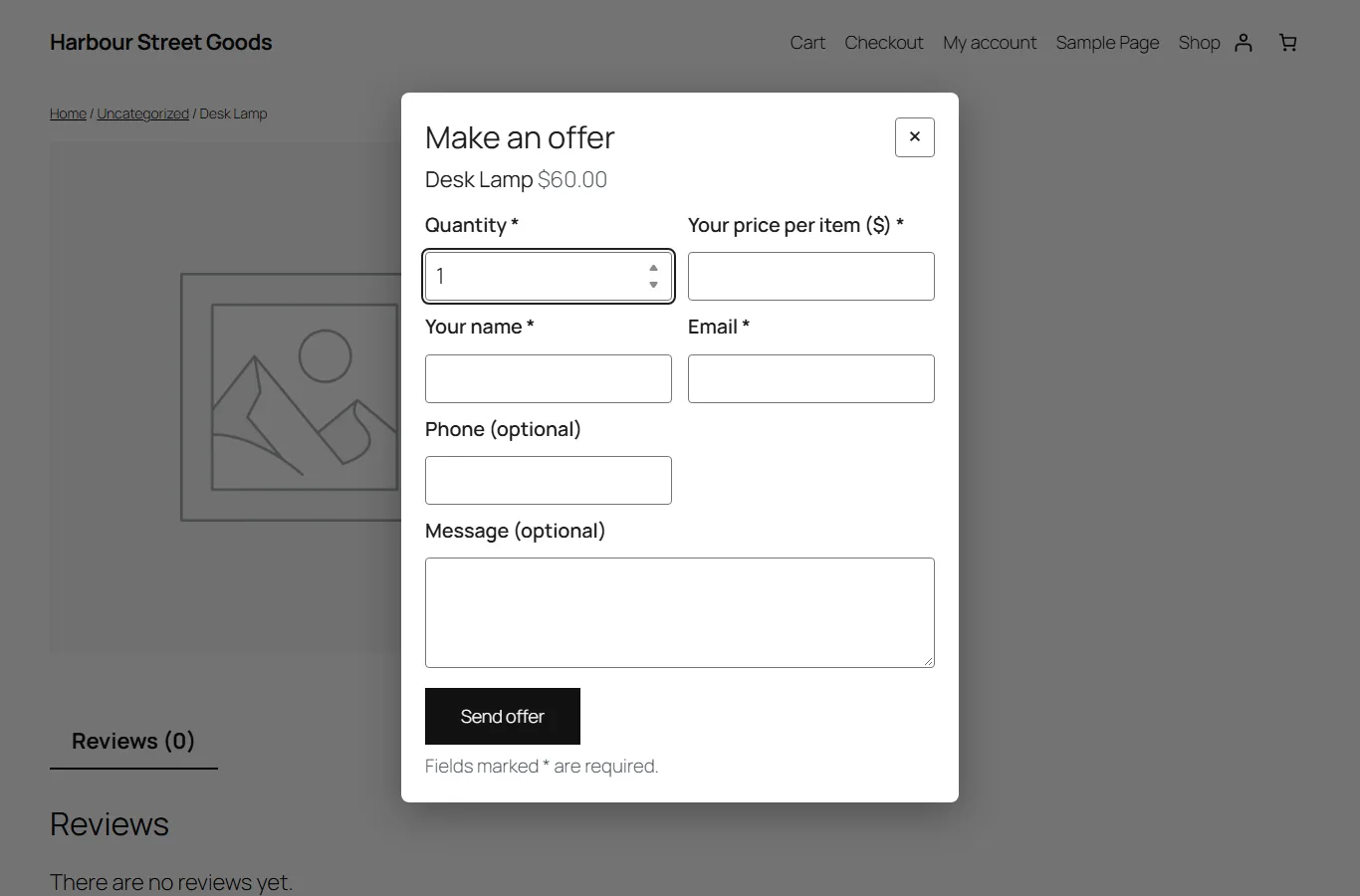
Codiffy Make an Offer adds a “Make an offer” button to your WooCommerce products. A customer enters the quantity and the price they would like to pay, and you decide: accept, decline or send a counter-offer. When you agree, the customer gets an email with a secure link to add the product to their cart at the agreed price.
The agreed price is personal. It applies only in the cart of the customer who negotiated it, only for the agreed quantity, only until the offer expires, and only once. Other shoppers always see and pay your normal price.
How a price offer works: an example
- You go to WooCommerce > Settings > Offers, tick Enable offers and save.
- A customer clicks Make an offer on a $45 product and offers 2 × $35.
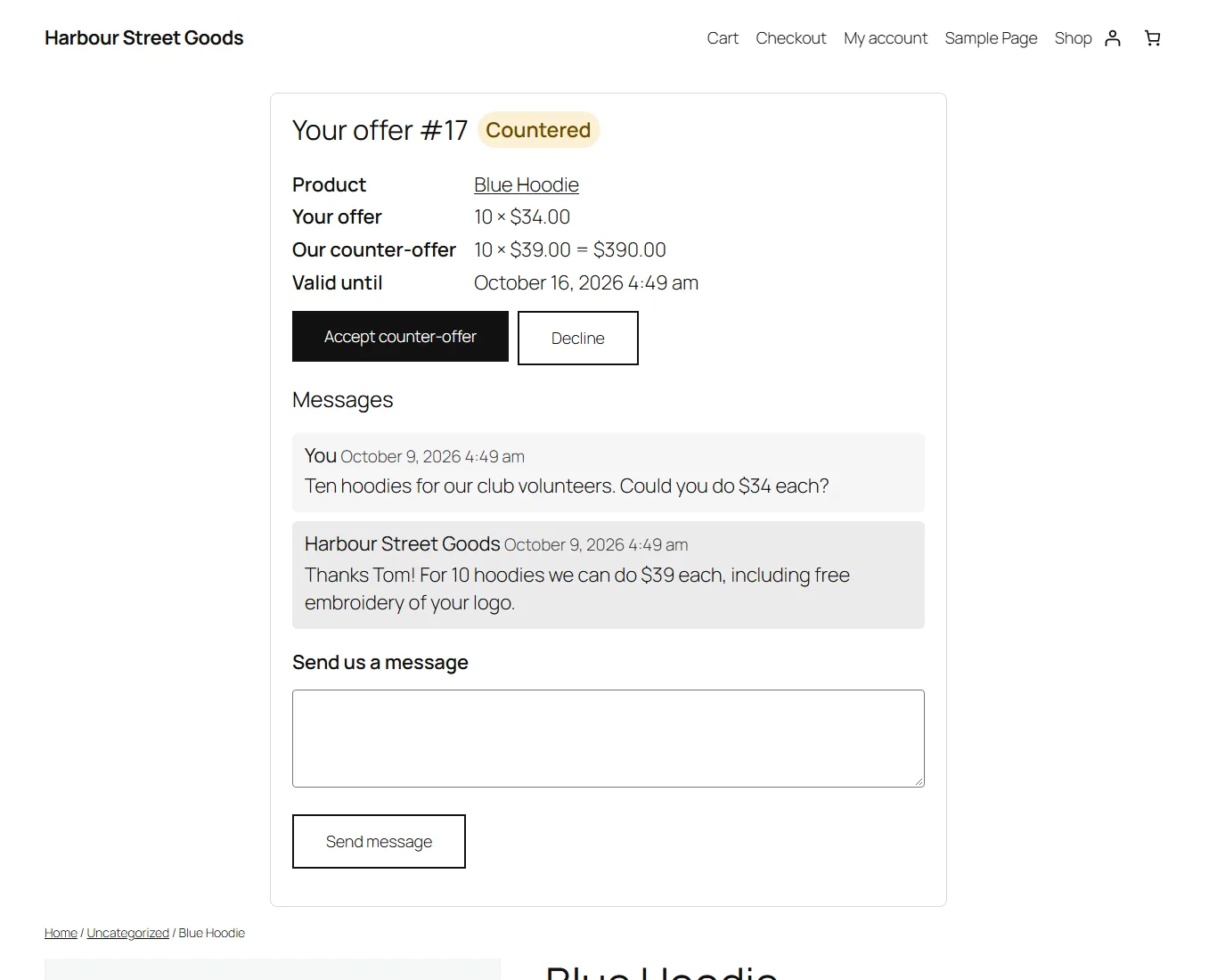
- You open WooCommerce > Offers and send a counter-offer of 2 × $38.
- The customer accepts the counter-offer from the link in their email and clicks Add to cart at the agreed price. The cart shows $38 each, for exactly 2.
- The customer checks out as normal, and the offer is marked completed and linked to the order.
If the customer changes nothing, the price holds for the validity you choose (7 days by default). Anyone else who opens the product page still sees $45.
The agreed-price rule
The agreed price applies to a cart item only when all of these are true, checked on the server every time the cart is calculated:
- the offer is accepted, has not expired and has not been used in an order;
- the product (and variation) is the one in the offer;
- the quantity is exactly the agreed quantity, so the quantity is locked in the cart;
- the cart belongs to the customer: the same account for logged-in customers or, for guests, the browser session that sent the offer or opened the email link.
If any check fails, the item goes back to the normal price and the customer is told why.
How to set up offers in WooCommerce
- Install Codiffy Make an Offer from Plugins > Add New (search for “Codiffy Make an Offer”) and activate it. WooCommerce 8.0 or newer must be active.
- Go to WooCommerce > Settings > Offers and tick Enable offers.
- Choose where offers are allowed: all products, or selected products and categories with exclusions, optionally only above a minimum price and not for out-of-stock products.
- Optionally set a minimum offer as a percentage of the price, the validity in days, whether guests may make offers, and the button in shop and category pages.
- Save. The button stays hidden until you enable offers, so activating the plugin never changes your shop by surprise.
Everything else it does
- Emails for every step, styled with your WooCommerce email colors, header and footer, with editable subjects and introductions.
- Low offers below your minimum percentage are declined at once with a friendly message and are not saved.
- My Account > Offers lists a logged-in customer’s own offers.
- Spam protection: a nonce, a hidden honeypot field and a limit of 5 offers per hour per visitor.
- Privacy tools: personal data export and erase by email address, and suggested privacy policy text.
- Shop managers can handle offers; no administrator account is needed. It works with the block and classic cart and checkout and with High-Performance Order Storage, and contacts no external service.
For developers
The filter codiffy_mao_is_offerable( $ok, $product ) changes which products accept offers, and codiffy_mao_rate_limit( $limit ) how many offers a visitor may send per hour (5 by default). Add #make-an-offer to a product link to open the offer form straight away.
Download the free plugin
Codiffy Make an Offer is listed in the WordPress.org plugin directory. Download it free from WordPress.org, or install it from Plugins > Add New in WordPress. It is free under the GPLv2 or later license.
Need something it doesn’t do?
Codiffy builds and changes WooCommerce plugins to order, from quote requests to wholesale prices per customer. Book a free call and get a fixed price before any work starts. More free plugins from us: Box Builder for WooCommerce, Tiered Pricing for WooCommerce and Store Hours for WooCommerce.
Compatibility
- WordPress6.5 or later, tested with 7.1
- WooCommerce8.0 or later, tested with 11.2, HPOS
- PHP7.4 or later
- Cart and checkoutBlock and classic
- LicenseGPLv2 or later, free
- Version1.0.0, on WordPress.org since 20 November 2026
Compatibility is what the WordPress.org listing states. Running a newer WordPress or WooCommerce version? Ask us before you install and we will tell you honestly whether it has been checked.
Questions about Codiffy Make an Offer for WooCommerce.
Can other customers get the price I agreed with one customer?
No. The agreed price is tied to that customer's account, or for guests to the browser session that sent the offer or opened the email link. Every other shopper pays the normal price, and the agreed price is never shown publicly.
Can the customer change the quantity in the cart?
No. The agreed price is for the agreed quantity, so the quantity is fixed for that cart item. To buy more, the customer can add the product again at the normal price, or make a new offer.
What happens when an offer expires?
Accepted prices and counter-offers are valid for the number of days set in Offer validity, 7 by default. After that the offer is marked expired and the agreed price no longer applies. You can accept or counter an expired offer again to give the customer a new link.
Do guests need an account?
No, unless you untick Allow visitors who are not logged in to make offers. Guests use the secure link in their email.
Does it work with variable products?
Yes. The customer chooses the options first, then makes an offer for that variation. In product lists the button is shown for simple products only.
Does it work with the block cart and checkout?
Yes. The agreed price appears in the block cart, mini-cart and checkout, as well as in the classic cart and checkout.
Do coupons work on agreed prices?
Yes. Coupons apply to the agreed price like any other price. Use your coupon's own restrictions if you want to exclude products.
Does the plugin send data to other websites?
No. It does not contact any external service and does not track visitors.
More plugins
Plugin store
Ready-made plugins for WordPress and WooCommerce, built and supported by the Codiffy team.
-
WooCommerce plugin
WooCommerce Price Based On Country
Show different product prices to shoppers depending on their country.
$19View plugin -
WooCommerce plugin
WooCommerce Custom Buy Button
Change what the buy button says and where it sends your customers.
$19View plugin -
WooCommerce plugin
WooCommerce Bulk Edit Product Prices
Update prices across many products at once instead of one by one.
$19View plugin -
WooCommerce plugin
WooCommerce Product Bundle Table
Present bundled products in a clean table shoppers can buy from.
$29View plugin -
WooCommerce plugin
WooCommerce Conditional Shipping & Payment Methods
Show or hide shipping and payment options based on conditions you set.
$19View plugin -
WordPress plugin
Google reCAPTCHA for WordPress & WooCommerce
Protect your forms, login and checkout from spam and bots.
$19View plugin -
WordPress plugin
Approve New User Registration
Review and approve new WordPress and WooCommerce accounts before they go live.
$15View plugin -
Free WooCommerce plugin
Store Hours for WooCommerce
Take orders only when you're open: daily hours, holidays and a one-click close, free on WordPress.org.
FreeView plugin -
Free WooCommerce plugin
Table Rate Shipping for WooCommerce
Shipping prices from your own table: by weight, cart total, items, size or shipping class, per zone. Free.
FreeView plugin -
Free WooCommerce plugin
Tiered Pricing for WooCommerce
Quantity discounts and a bulk pricing table per product, variation or category, free on WordPress.org.
FreeView plugin -
Free WordPress plugin
FormShield Guard
Self-hosted spam protection for logins, checkout, comments and contact forms. No CAPTCHA service.
FreeView plugin -
Free WooCommerce plugin
Box Builder for WooCommerce
Let customers build their own gift or pick-your-own box from products you choose. Free.
FreeView plugin -
Free WooCommerce plugin
Make an Offer for WooCommerce
Let customers name their price. Accept, decline or counter; the agreed price applies only in their cart. Free on WordPress.org.
FreeView plugin
Need it to do something else?
We build and change WordPress and WooCommerce plugins to order. Book a free 30-minute call and leave with a fixed quote.
Prefer we call you? Request a callback