

Free Self-Hosted Spam Protection for WordPress and WooCommerce
Codiffy FormShield Guard is a free anti-spam plugin that checks logins, sign-ups, comments, WooCommerce checkout and contact forms on your own server. It uses signed one-time tokens, a small browser puzzle, rate limits and your own content rules, with no CAPTCHA service, account or subscription.
FreeDirect download, GPLv2 or later
- Free ZIP download from codiffy.com
- Awaiting review on WordPress.org
- Built and supported by Codiffy
- For WordPress
What it does
FormShield Verify
Every protected form gets a signed, single-use token from your site, bound to the form and the visitor's browser session. The browser solves a small puzzle, usually in well under a second.
Checks on your server
Each form plugin's own validation calls FormShield Guard before any email, account, order, payment or webhook happens.
Rate limits without lock-outs
Limits per network, browser session and account. Account limits only make the check harder, so nobody can lock out someone else.
Hidden field
A honeypot that keyboard and screen-reader users never reach.
Content rules
Link limits, blocked domains, your own phrases or patterns and repeated-text detection. Never based on language or alphabet.
Works with page caching
Pages carry no visitor-specific values; tokens come from an uncached endpoint.
Spam evidence
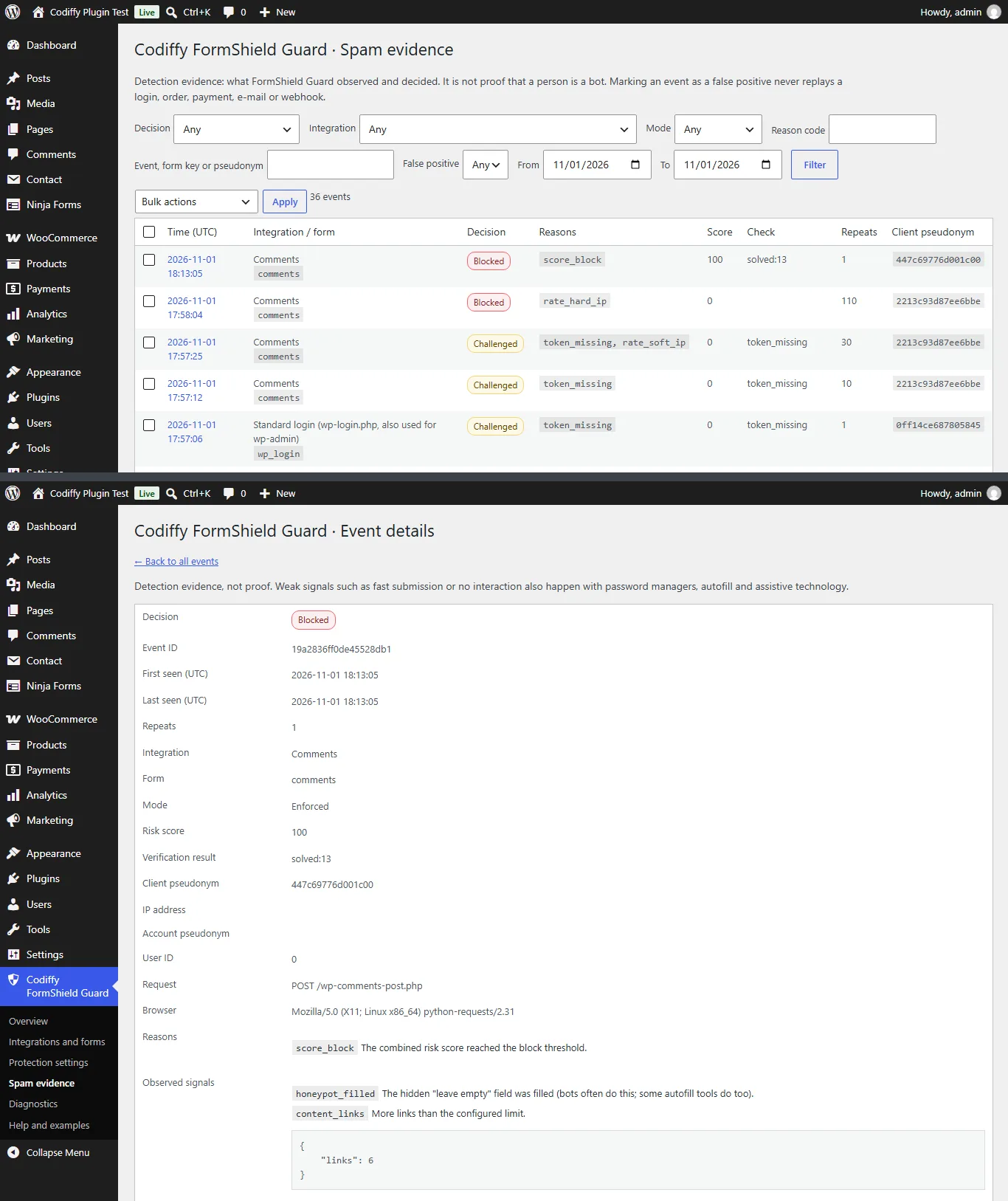
Every blocked or challenged submission is logged with its reasons and score, and a pseudonym instead of the IP address. Filter, export and mark false positives.
Safe for administrators
Login protection turns on only after a self-test in your own browser, and there is a documented recovery switch.
Codiffy FormShield Guard reduces automated abuse of your WordPress forms with several layers that run on your own server, instead of one CAPTCHA. No form data is sent to any other service. Each form can be Disabled, Monitor only (records what would happen, never blocks), Balanced or Strict.
It reduces spam and bot traffic. It cannot prove that a visitor is human, and no tool stops all spam.
How it stops spam: a worked example
A shop runs WooCommerce, Contact Form 7 and blog comments, with FormShield Guard in Balanced mode.
- A bot posts a comment straight to
wp-comments-post.phpwithout loading the page. It has no token, so the comment is refused and nothing is saved. - A bot that does load the page posts a comment with six links to a blocked domain. The token is valid, but the content scores as spam, so the comment goes to the Spam folder and no moderation email is sent.
- A customer’s password manager fills the login form instantly. Instant submission is only a weak signal, so the customer logs in normally.
- One network starts sending dozens of registrations. First its visitors get a harder puzzle; past the hard limit, the network is blocked for the rate-limit window. Other visitors are not affected.
- Every refused or challenged attempt appears under Spam evidence with the reason, so you can see what was stopped and mark mistakes.
How to set up spam protection
- Install and activate the plugin. Nothing changes on your site yet: every protection starts disabled.
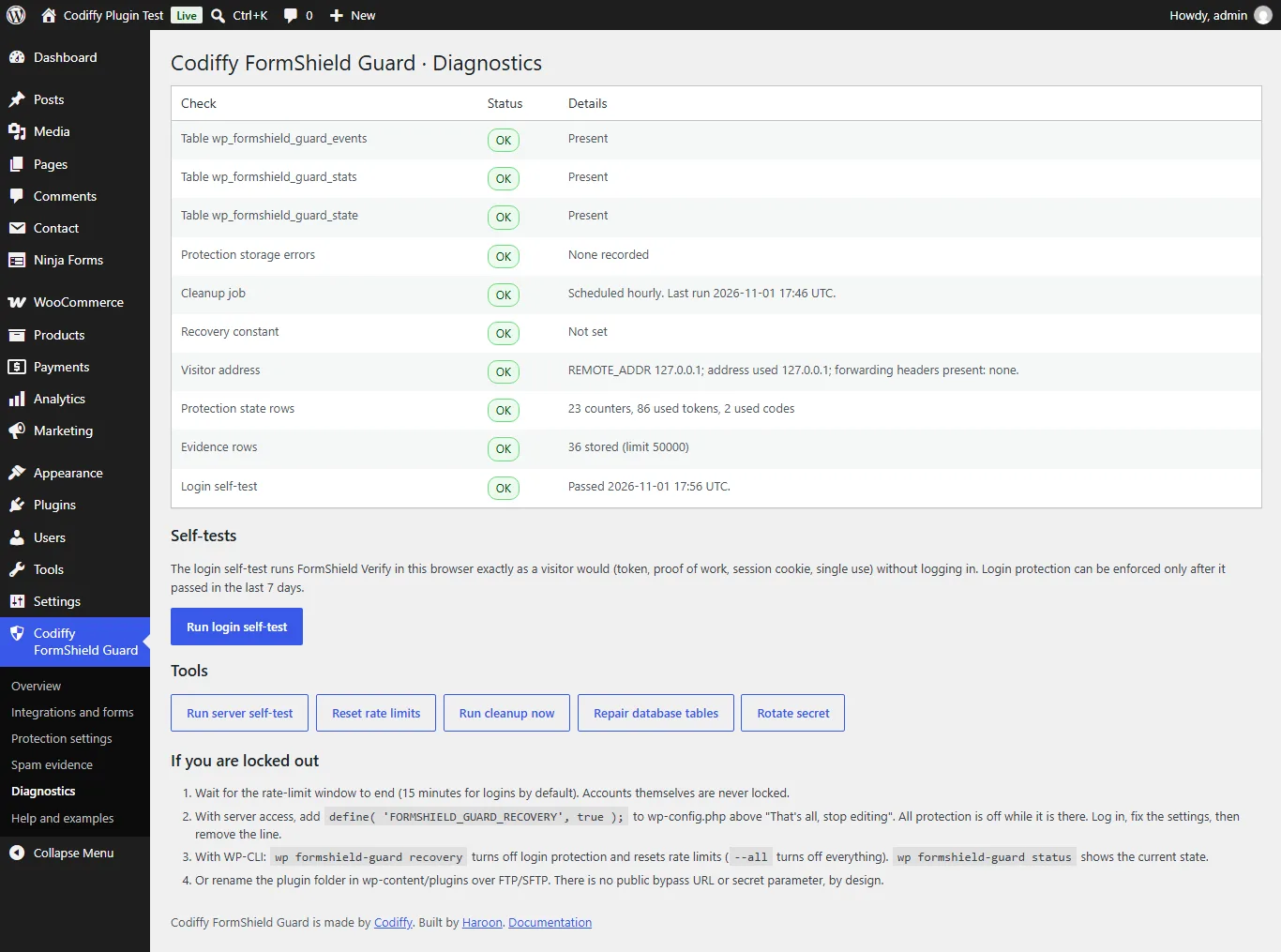
- Open Codiffy FormShield Guard > Diagnostics and run the server self-test and the login self-test.
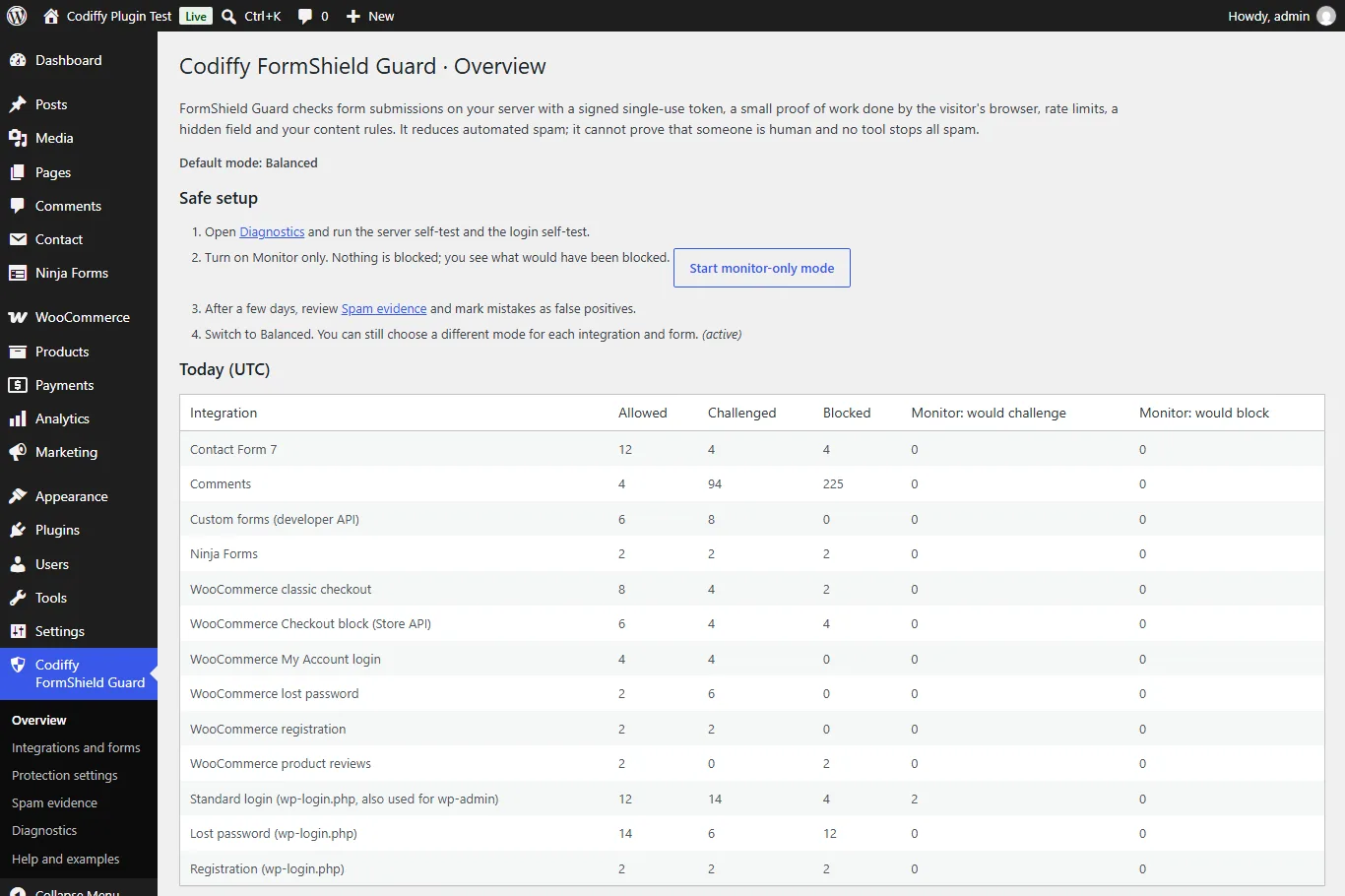
- On the Overview page, choose “Start monitor-only mode”. For a few days, FormShield Guard records what it would block without blocking anything.
- Review Spam evidence, then switch to Balanced. You can still set each integration and each form separately.
- If your site is behind a proxy or CDN, add its addresses under Protection settings > Trusted proxies.
Forms it protects
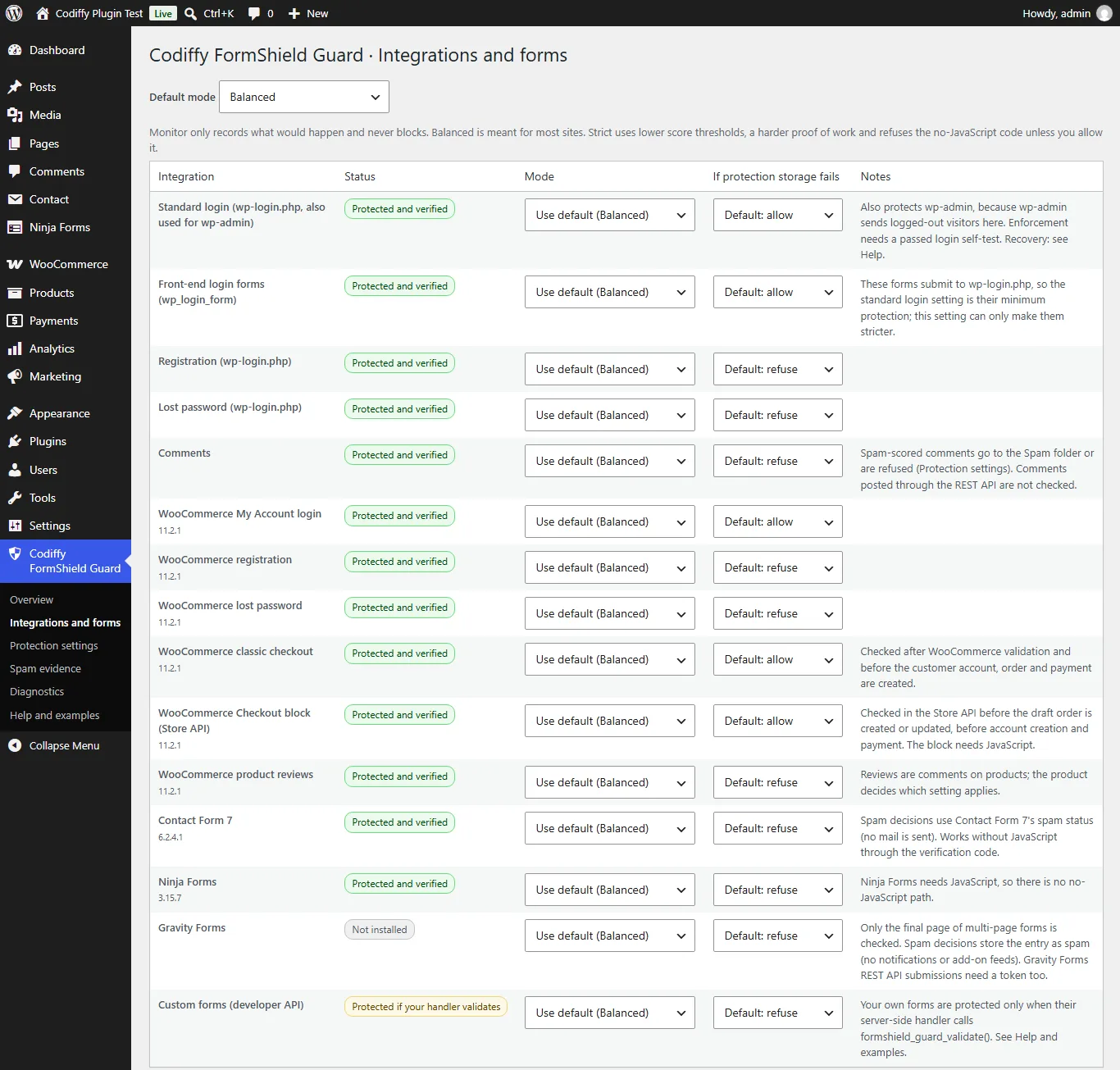
- WordPress login (wp-login.php, which also protects wp-admin), front-end login forms, registration, lost password and comments.
- WooCommerce: My Account login, registration and lost password, classic checkout, the Checkout block (Store API) and product reviews. HPOS compatible.
- Contact Form 7, Ninja Forms and Gravity Forms, each form separately.
- Your own forms, through a small PHP and JavaScript API.
For developers
Register a form with formshield_guard_register_form(), print formshield_guard_render() inside it and call formshield_guard_validate() first in your server-side handler. The plugin ships examples for admin-post.php, admin-ajax.php and REST routes, a [formshield_guard] shortcode and WP-CLI commands (wp formshield-guard status, recovery, mode, reset-limits, cleanup, selftest).
Download the free plugin
Enter your details and the download starts straight away (version 1.0.0, a ZIP of about 100 KB). Install it from Plugins > Add New > Upload Plugin in WordPress. Codiffy FormShield Guard is free under the GPLv2 or later license, with no account or subscription.
Thank you, and welcome. Your download has started.
If it does not start, download the ZIP here (the link works for 24 hours). To install it, go to Plugins > Add New > Upload Plugin in WordPress.
Want to read first? The FormShield Guard user guide (PDF) explains every setting, the integrations and the recovery steps.
Need something it doesn’t do?
Codiffy builds and changes WordPress and WooCommerce plugins to order. Book a free call and get a fixed price before any work starts. More free plugins from us: Store Hours for WooCommerce, Tiered Pricing for WooCommerce and Table Rate Shipping for WooCommerce.
Compatibility
- WordPress6.5 or later, tested with 7.1
- PHP7.4 or later, tested with 8.3
- WooCommerceOptional: 8.0 or later, tested with 11.2, HPOS and the Checkout block
- Contact Form 7Tested with 6.2
- Ninja FormsTested with 3.15
- Gravity FormsTested with 3.2
- Page cachingSupported
- DatabaseMySQL, MariaDB and SQLite
- LicenseGPLv2 or later, free
- Version1.0.0
Compatibility is what the plugin's readme states. Running a newer WordPress or WooCommerce version? Ask us before you install and we will tell you honestly whether it has been checked.
Questions about Codiffy FormShield Guard.
Does it use a third-party CAPTCHA service?
No. FormShield Verify is part of the plugin and runs on your server and in the visitor's browser. Nothing is sent to an outside service, and it is not affiliated with any CAPTCHA provider.
Is it 100% effective?
No tool is. A determined attacker with a real browser can pass. FormShield Guard makes automated abuse slower and more expensive, and shows you the evidence.
Will it lock me out of wp-admin?
Login protection can only be turned on after a passed self-test in your browser, and accounts are never locked. If you ever need to, add define( 'FORMSHIELD_GUARD_RECOVERY', true ); to wp-config.php, run wp formshield-guard recovery, or rename the plugin folder.
Does it work with page caching?
Yes. Protected pages contain no tokens; the browser fetches them from an uncached endpoint.
What does it not protect?
REST API logins and application passwords, XML-RPC, WP-Cron, payment-gateway callbacks, webhooks, other plugins' own login forms, and any form whose handler does not call FormShield Guard.
What if JavaScript is turned off?
Visitors can get a one-time verification code from a separate page. You can refuse this in Strict mode.
What personal data does it keep?
Reasons, score and rate-limit details, with a keyed pseudonym instead of the IP address. Passwords, payment data, cookies, reset links and files are never stored. Retention limits and the WordPress personal-data export and erase tools are included.
Is it free?
Yes. It is free under the GPL, with no account or subscription.
More plugins
Plugin store
Ready-made plugins for WordPress and WooCommerce, built and supported by the Codiffy team.
-
WooCommerce plugin
WooCommerce Price Based On Country
Show different product prices to shoppers depending on their country.
$19View plugin -
WooCommerce plugin
WooCommerce Custom Buy Button
Change what the buy button says and where it sends your customers.
$19View plugin -
WooCommerce plugin
WooCommerce Bulk Edit Product Prices
Update prices across many products at once instead of one by one.
$19View plugin -
WooCommerce plugin
WooCommerce Product Bundle Table
Present bundled products in a clean table shoppers can buy from.
$29View plugin -
WooCommerce plugin
WooCommerce Conditional Shipping & Payment Methods
Show or hide shipping and payment options based on conditions you set.
$19View plugin -
WordPress plugin
Google reCAPTCHA for WordPress & WooCommerce
Protect your forms, login and checkout from spam and bots.
$19View plugin -
WordPress plugin
Approve New User Registration
Review and approve new WordPress and WooCommerce accounts before they go live.
$15View plugin -
Free WooCommerce plugin
Store Hours for WooCommerce
Take orders only when you're open: daily hours, holidays and a one-click close, free on WordPress.org.
FreeView plugin -
Free WooCommerce plugin
Table Rate Shipping for WooCommerce
Shipping prices from your own table: by weight, cart total, items, size or shipping class, per zone. Free.
FreeView plugin -
Free WooCommerce plugin
Tiered Pricing for WooCommerce
Quantity discounts and a bulk pricing table per product, variation or category, free on WordPress.org.
FreeView plugin -
Free WordPress plugin
FormShield Guard
Self-hosted spam protection for logins, checkout, comments and contact forms. No CAPTCHA service.
FreeView plugin
Need it to do something else?
We build and change WordPress and WooCommerce plugins to order. Book a free 30-minute call and leave with a fixed quote.
Prefer we call you? Request a callback