

Free Build-Your-Own Box Plugin for WooCommerce
Codiffy Box Builder is a free WooCommerce plugin that lets customers build their own gift or pick-your-own box from products you choose, with a live counter, a live total and rules checked on the server. It is for chocolate, tea, coffee, wine, snack and gift shops that sell "pick any 6" boxes.
FreeDirect download, GPLv2 or later
- Free ZIP download from codiffy.com
- Awaiting review on WordPress.org
- Built and supported by Codiffy
- For WordPress with WooCommerce
What it does
New product type
Box (build your own), with its own Box tab in the product editor
Choose what goes in
Individual simple products and variations, whole categories, or both
Box size
A minimum and maximum number of items, or an exact size, plus a limit for any one item
Three pricing modes
A fixed box price, the sum of the chosen items, or the sum plus a box fee
Live counter and total
A grid with pictures, prices and stock, + and - buttons, "4 of 6 chosen" and the running total
One cart line per box
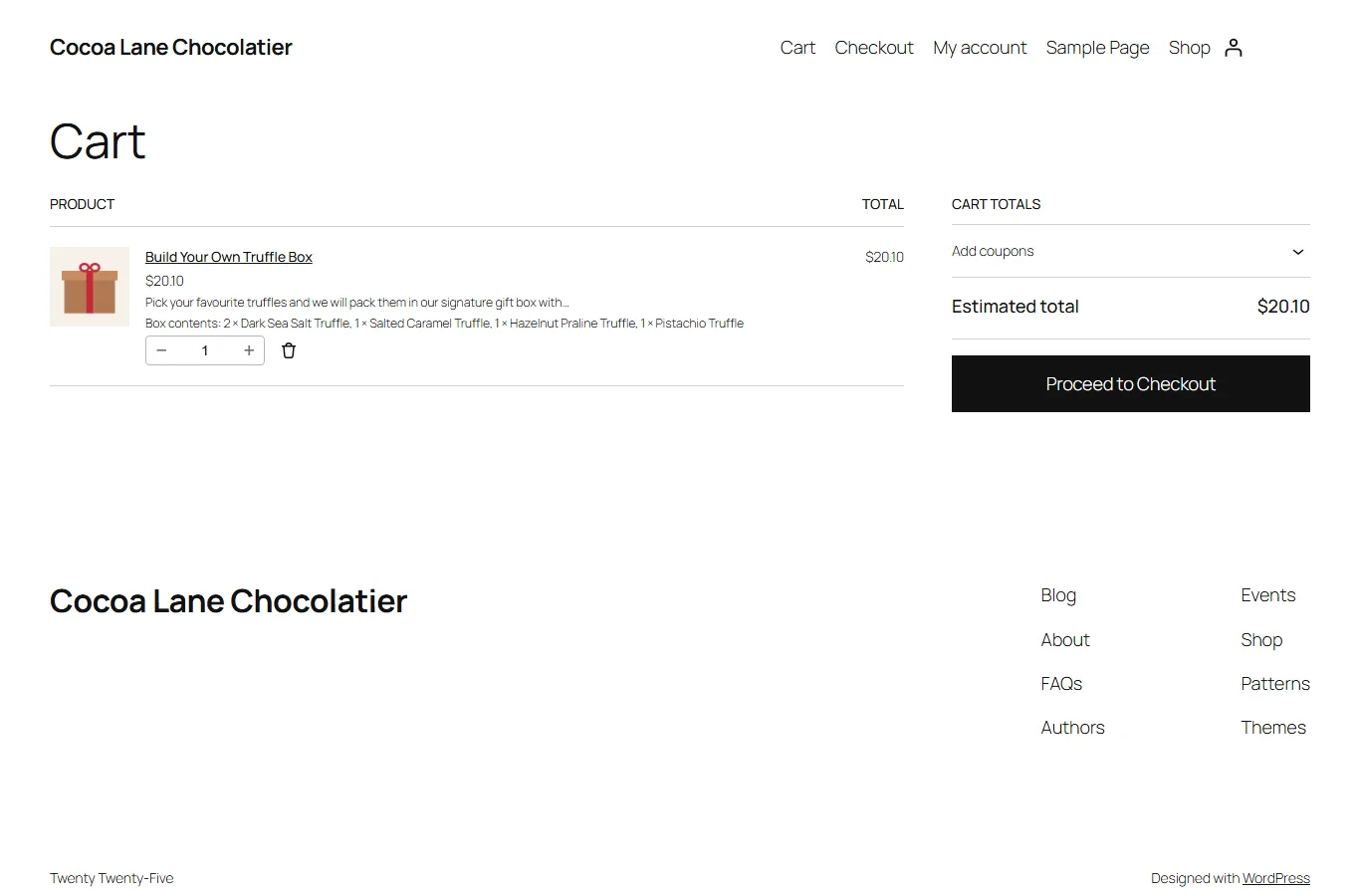
The contents are listed in the cart, checkout, order emails, My Account and the admin order screen
Stock of the items inside
Reduced when the order is placed and restored when it is cancelled or refunded with restock
Checked on the server
Contents, quantities, stock, product status and prices, including Store API add-to-cart requests
Codiffy Box Builder adds a new WooCommerce product type, Box (build your own). Customers open the box’s product page, pick the items they want from a grid and add the whole box to the cart as one product. A chocolate shop can sell “any 6 truffles”, a wine shop a “build your own 12-bottle case”, a tea shop a “pick 4 teas” gift box.
You decide which products may go in the box, how many items it holds and how it is priced. Every rule is checked again on the server when the box is added to the cart and before checkout, so a box can never be bought with items, quantities or prices you did not allow.
How a build-your-own box works: an example
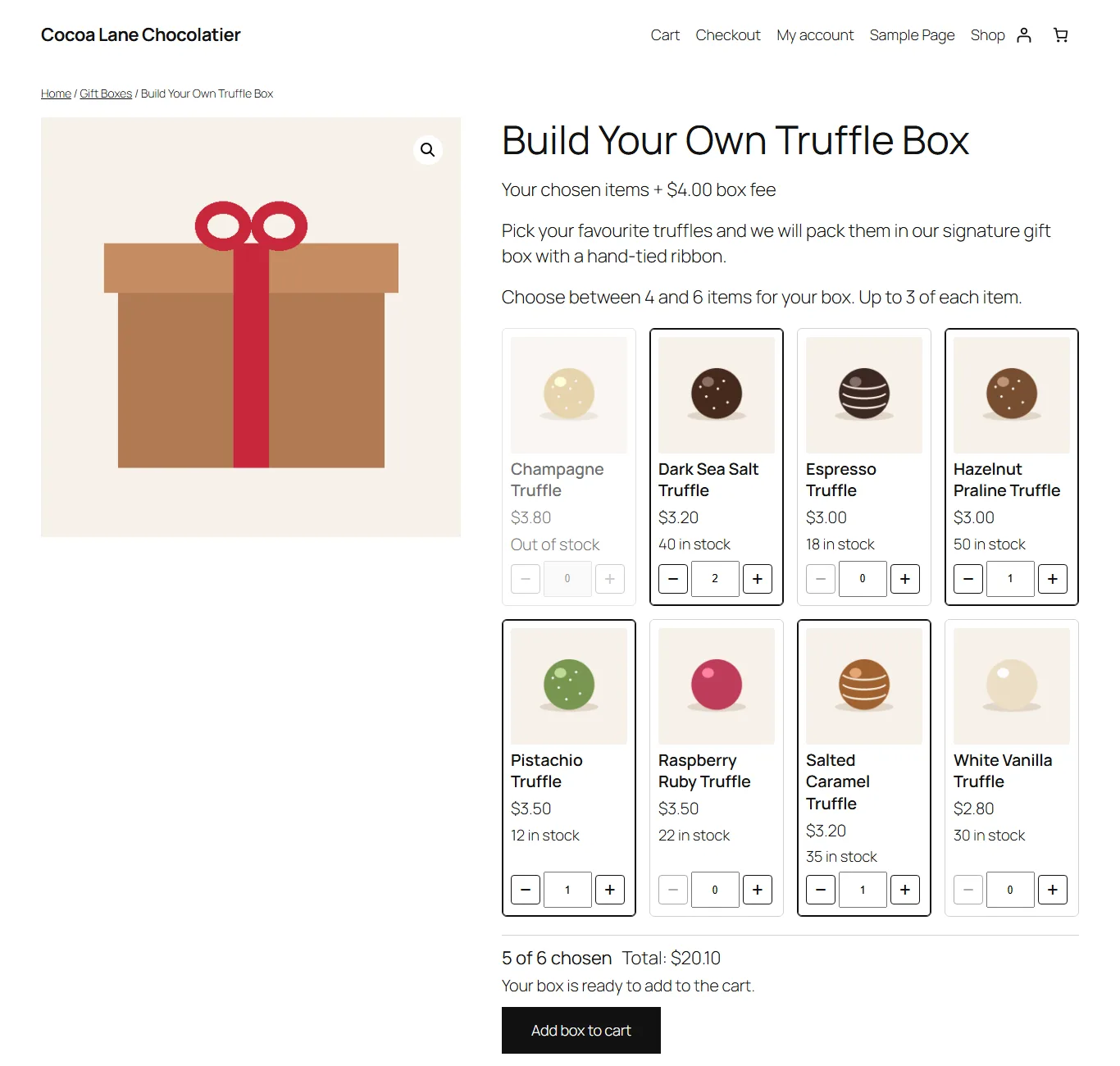
A chocolate shop creates “Build Your Own Truffle Box”: 4 to 6 truffles from its Truffles category, at most 3 of any one truffle, priced as the sum of the chosen truffles plus a $4.00 box fee for the ribbon and packaging.
- On the product page the customer sees every allowed truffle with its picture, price and stock, and adds them with the + and – buttons.
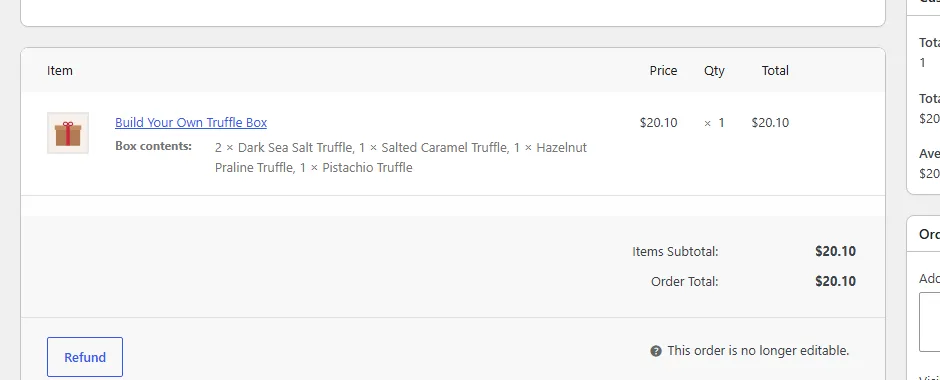
- The counter says how many are chosen (“5 of 6 chosen”) and the total updates as they go: in the example below five truffles cost $16.10, so the box is $16.10 + $4.00 = $20.10.
- Add to cart works only once the box holds between 4 and 6 truffles. A sold-out truffle cannot be chosen.
- The cart shows one line for the box, with its contents listed underneath. The same box with different contents becomes a separate line.
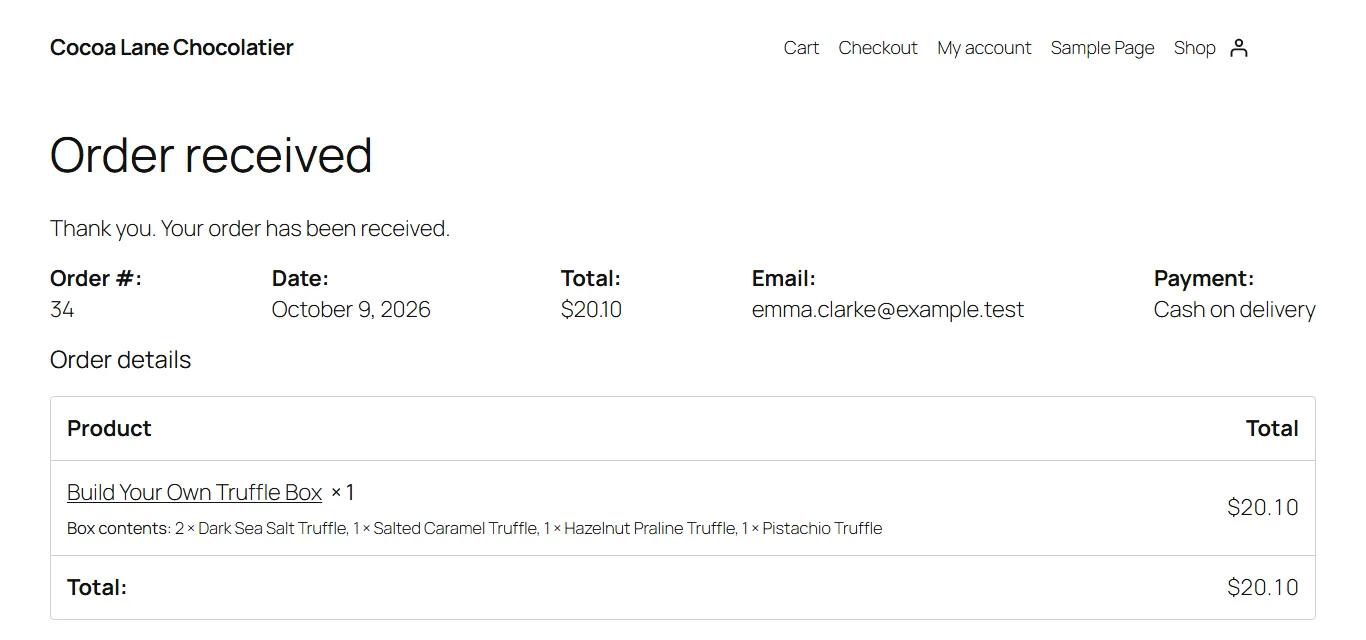
- When the order is placed, the stock of every truffle inside goes down; it comes back if the order is cancelled.
How to set up a gift box in WooCommerce
- Make sure WooCommerce 8.0 or newer is active, then install the plugin from the ZIP below under Plugins > Add New > Upload Plugin and activate it.
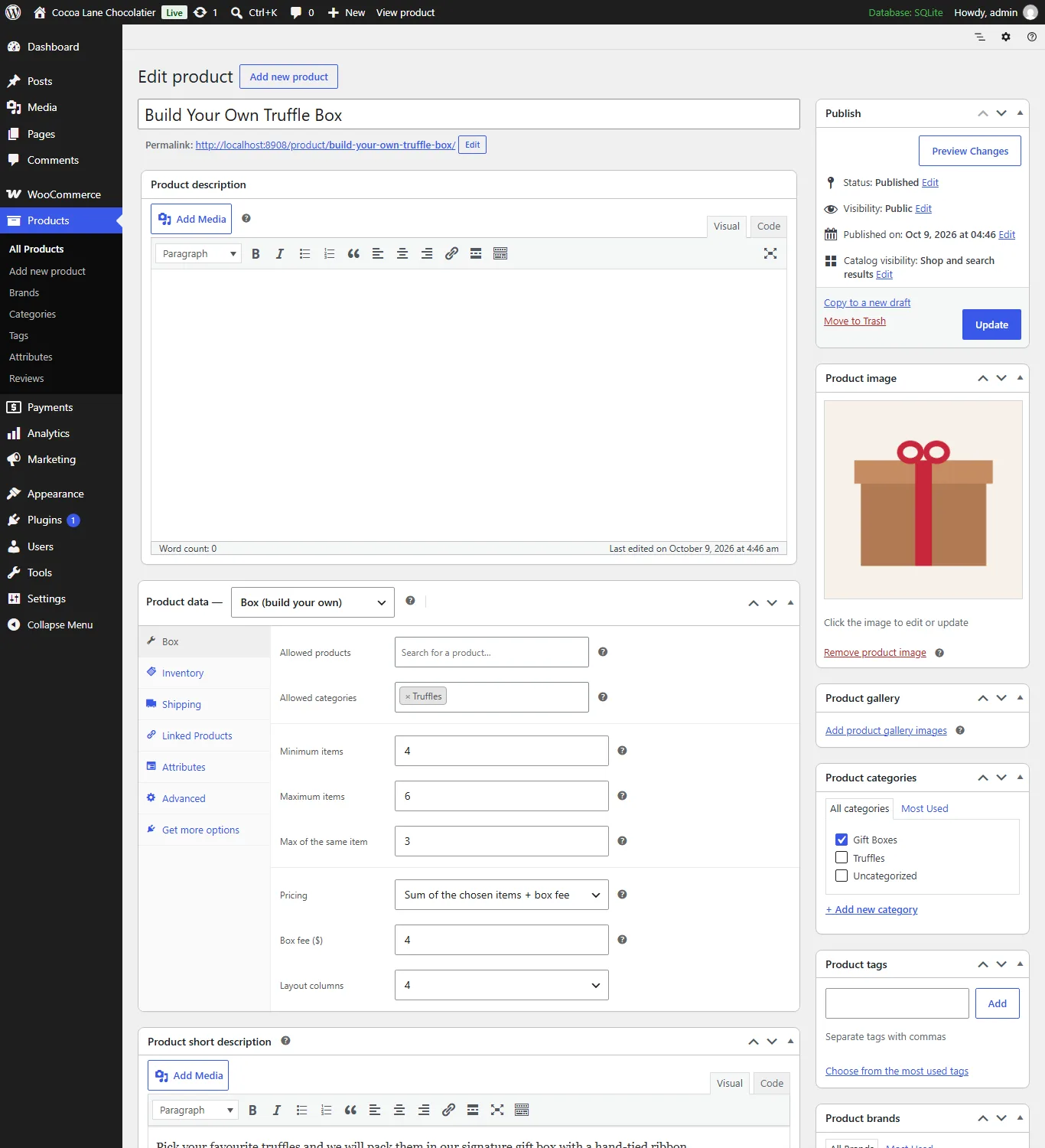
- Go to Products > Add New and choose Box (build your own) as the product type.
- On the General tab set the box price (for a fixed-price box) and its tax status and class.
- On the Box tab choose the allowed products or categories, the minimum and maximum number of items, the limit for any one item and the pricing mode.
- Publish. Customers fill the box on its product page and add it to the cart.
Activating the plugin changes nothing in your store until you create a box product. It has no settings page, contacts no external service, tracks nobody, and loads its files only on box product pages.
Three ways to price a box
- Fixed box price: the regular and sale price from the General tab, whatever goes inside.
- Sum of the chosen items: the current prices of the items inside, sale prices included.
- Sum of the items plus a box fee: the items’ prices plus your fee once per box, for example for packaging.
The box is taxed as one product with the tax status and class from its General tab. Large catalogs load 12 items at a time with a “Load more” button.
The box contents follow the order
The contents are listed under the box in the cart, at checkout, in order emails, in My Account and on the admin order screen, so whoever packs the order sees exactly what to put in.
For developers
The filter codiffy_box_builder_items_per_page changes how many items the builder shows before “Load more” (12 by default). It works with block themes and classic themes, and with the block and classic cart and checkout; add-to-cart requests through the WooCommerce Store API are checked the same way.
Download the free plugin
Codiffy Box Builder is waiting for its review in the WordPress.org plugin directory. Until it is listed, download version 1.0.0 here, the same package that was submitted: enter your details and the download starts straight away. It is free under the GPLv2 or later license.
Thank you, and welcome. Your download has started.
If it does not start, download the ZIP here (the link works for 24 hours). To install it, go to Plugins > Add New > Upload Plugin in WordPress.
Need something it doesn’t do?
Codiffy builds and changes WooCommerce plugins to order, from a subscription box to a full product configurator. Book a free call and get a fixed price before any work starts. More free plugins from us: Make an Offer for WooCommerce, Tiered Pricing for WooCommerce and Store Hours for WooCommerce.
Compatibility
- WordPress6.5 or later, tested with 7.1
- WooCommerce8.0 or later, tested with 11.2
- PHP7.4 or later
- Cart and checkoutBlock and classic
- LicenseGPLv2 or later, free
- Version1.0.0, awaiting review on WordPress.org
Compatibility is what the plugin's readme states. Running a newer WordPress or WooCommerce version? Ask us before you install and we will tell you honestly whether it has been checked.
Questions about Codiffy Box Builder for WooCommerce.
Which products can go in a box?
Published simple products and single variations that can be bought. Pick them under Allowed products, or allow whole categories under Allowed categories, which adds the simple products in those categories. To offer variations, add the variations themselves under Allowed products.
Can a customer cheat the price or add products I did not allow?
No. The browser only helps the customer choose. When the box is added to the cart, and again before checkout, the server checks that every item is allowed, published, purchasable and in stock, that the number of items is within your limits, and it calculates the price itself.
How is a box priced?
Choose a pricing mode on the Box tab. Fixed box price uses the General tab price. Sum of the chosen items adds up the items' current prices, sale prices included. Sum of the items plus a box fee adds your fee once per box.
How is tax calculated?
The box is taxed as one product with the tax status and tax class from its General tab. In the sum modes the item prices are added up first, then the box's tax settings apply.
What happens to stock?
The stock of every item inside the box is reduced when WooCommerce reduces the order's stock, and restored when the order is cancelled. When you refund boxes with Restock refunded items ticked, their contents are restocked too. The box product can also have its own stock to limit how many boxes you sell.
What if an item sells out while a box is in a customer’s cart?
The box is removed from the cart with a notice explaining why, so the customer can build it again.
Does it work with the block cart and checkout?
Yes. The contents are shown under the box in both the block and classic cart and checkout.
What is removed when I delete the plugin?
The plugin stores no options of its own. The box settings stay on your box products and order history stays untouched, so you can reinstall without losing anything. While the plugin is not active, box products cannot be bought.
More plugins
Plugin store
Ready-made plugins for WordPress and WooCommerce, built and supported by the Codiffy team.
-
WooCommerce plugin
WooCommerce Price Based On Country
Show different product prices to shoppers depending on their country.
$19View plugin -
WooCommerce plugin
WooCommerce Custom Buy Button
Change what the buy button says and where it sends your customers.
$19View plugin -
WooCommerce plugin
WooCommerce Bulk Edit Product Prices
Update prices across many products at once instead of one by one.
$19View plugin -
WooCommerce plugin
WooCommerce Product Bundle Table
Present bundled products in a clean table shoppers can buy from.
$29View plugin -
WooCommerce plugin
WooCommerce Conditional Shipping & Payment Methods
Show or hide shipping and payment options based on conditions you set.
$19View plugin -
WordPress plugin
Google reCAPTCHA for WordPress & WooCommerce
Protect your forms, login and checkout from spam and bots.
$19View plugin -
WordPress plugin
Approve New User Registration
Review and approve new WordPress and WooCommerce accounts before they go live.
$15View plugin -
Free WooCommerce plugin
Store Hours for WooCommerce
Take orders only when you're open: daily hours, holidays and a one-click close, free on WordPress.org.
FreeView plugin -
Free WooCommerce plugin
Table Rate Shipping for WooCommerce
Shipping prices from your own table: by weight, cart total, items, size or shipping class, per zone. Free.
FreeView plugin -
Free WooCommerce plugin
Tiered Pricing for WooCommerce
Quantity discounts and a bulk pricing table per product, variation or category, free on WordPress.org.
FreeView plugin -
Free WordPress plugin
FormShield Guard
Self-hosted spam protection for logins, checkout, comments and contact forms. No CAPTCHA service.
FreeView plugin -
Free WooCommerce plugin
Box Builder for WooCommerce
Let customers build their own gift or pick-your-own box from products you choose. Free.
FreeView plugin -
Free WooCommerce plugin
Make an Offer for WooCommerce
Let customers name their price. Accept, decline or counter; the agreed price applies only in their cart. Free on WordPress.org.
FreeView plugin
Need it to do something else?
We build and change WordPress and WooCommerce plugins to order. Book a free 30-minute call and leave with a fixed quote.
Prefer we call you? Request a callback