

Free Tiered Pricing and Bulk Discount Plugin for WooCommerce
Codiffy Tiered Pricing is a free WooCommerce plugin for quantity discounts: the price per item drops when a customer buys 10, 50 or 100, and a bulk pricing table on the product page shows what they save. It is for wholesalers, print shops, coffee roasters, party and office suppliers, and any store that sells in volume.
FreeOn WordPress.org
- Free download on WordPress.org
- Built and supported by Codiffy
- For WordPress with WooCommerce
What it does
Price tiers
Each tier has a minimum quantity and a fixed price per item or a percentage discount
Per product or variation
Tiers on a simple product, on all variations at once, or on one variation
Rule sets for categories
Give whole categories or chosen products the same tiers, with a priority
Bulk pricing table
Quantity, price per item and "You save" on the product page, with the active tier highlighted and a live total
Correct cart prices
Worked out on the server for the classic and block cart and checkout; prices sent by the browser are ignored
Count per line or per product
6 small and 4 large T-shirts can count as 10
Sale prices
Apply tiers to the sale price, or switch tiers off while a product is on sale
"From" price
Optional lowest price in shop and category lists, such as "From $9.60"
Tiered pricing means the price per item drops as the customer buys more: a mug costs $12 on its own, $10 each from 10 mugs, and 20% less from 50. Codiffy Tiered Pricing, a free tiered pricing and bulk discount plugin for WooCommerce, lets you set those quantity steps (“tiers”) on a product, on a variation or for whole categories. It shows a bulk pricing table on the product page and uses the right price in the cart and at checkout, with no coupon code for the customer to enter.
How WooCommerce tiered pricing works: a worked example
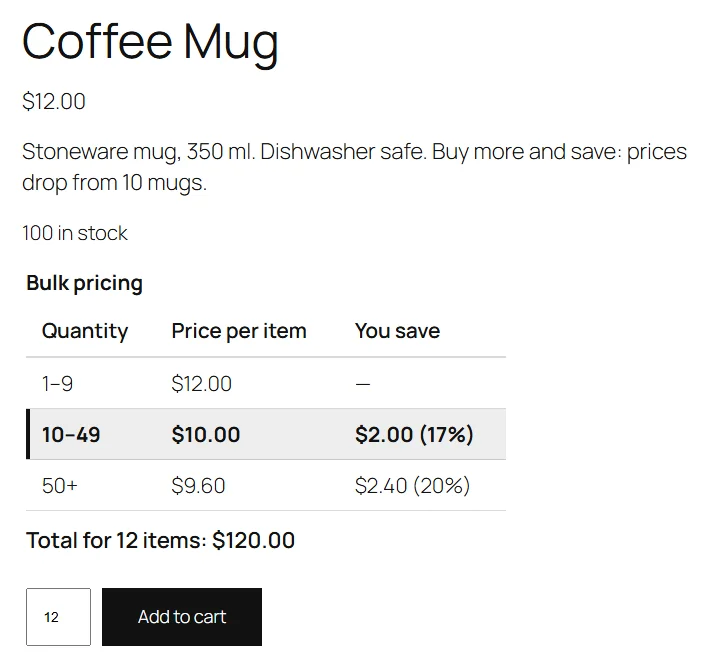
A store sells a coffee mug at a normal price of $12.00 and gives it two tiers:
| Quantity | Tier | Price per item | You save |
|---|---|---|---|
| 1 to 9 | None, the normal price | $12.00 | Nothing |
| 10 to 49 | Fixed price per item: 10 | $10.00 | $2.00 (17%) |
| 50 or more | Percentage discount: 20 | $9.60 | $2.40 (20%) |
The customer gets the tier with the highest minimum quantity they reach. Someone buying 9 mugs pays $108.00, someone buying 12 pays $10.00 each, $120.00 in total, and someone buying 50 pays $9.60 each, $480.00 in total. Each tier runs until the next one starts, so you never enter a maximum quantity.
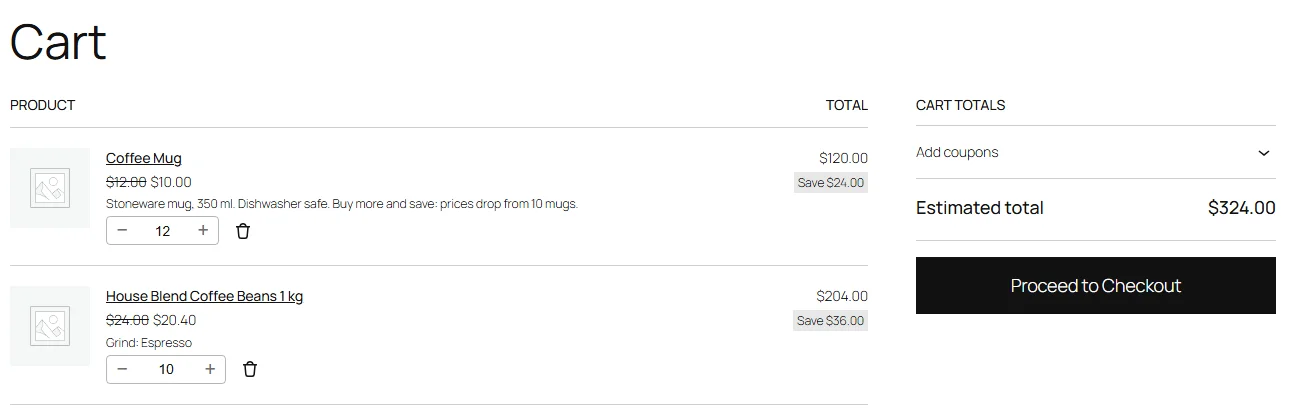
In the cart, each line uses its tier price and shows the normal price crossed out, so the customer sees what they saved. A percentage tier is worked out from each product’s own price: 10 bags of coffee at $24.00 with a 15% tier cost $20.40 each.
Quantity discounts per product, per variation or for a whole category
- On a product: in Product data > General, under Tiered pricing. On a variable product, these tiers apply to every variation that has none of its own, worked out from each variation’s price.
- On a variation: a variation with its own tiers ignores the product’s tiers. The table on the product page follows the variation the customer chooses.
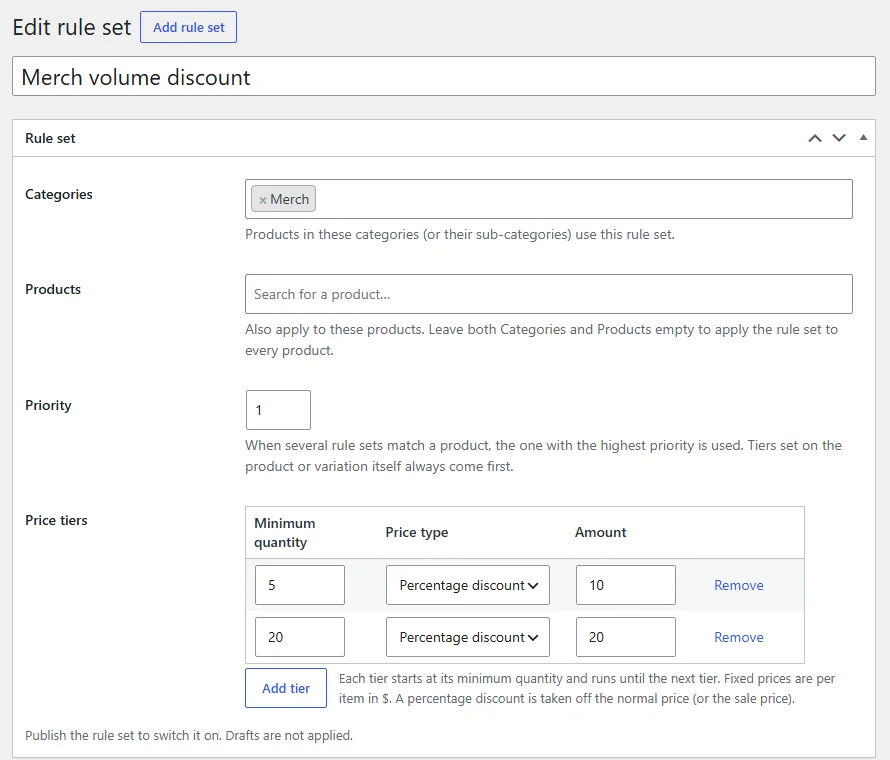
- With rule sets: under WooCommerce > Tiered Pricing, give whole categories (and their sub-categories) or chosen products the same tiers. When several rule sets match, the one with the highest priority wins. Drafts are not applied, so you can prepare a sale and publish it later.
Only one set of tiers is used for a product, and they are never added together: the variation’s own tiers first, then the product’s, then the highest-priority matching rule set. A tier can never make an item more expensive than its normal or sale price, and never cheaper than zero. Coupons still work and are applied on top of the tier prices.
How to set up tiered pricing in WooCommerce
- In WordPress, go to Plugins > Add New, search for “Codiffy Tiered Pricing”, click Install Now, then Activate. WooCommerce must be active.
- Edit a product. In Product data > General, scroll to Tiered pricing.
- Add a row for each tier: the minimum quantity, Fixed price per item or Percentage discount, and the amount. Click Add tier for more rows.
- Click Update. The bulk pricing table appears on the product page and the cart uses the tier prices.
- Optional: choose where the table shows, the “You save” column, the live total and the “From” price under WooCommerce > Settings > Products > Tiered pricing.
Activating the plugin changes no price on its own: prices only change for products you give tiers to, directly or through a rule set. When you save, tiers are sorted by quantity, and rows that are invalid or duplicated are refused with a message that says which ones.
Settings that change how the discount works
- Count quantity: per cart line, or per product so that all variations count together. With per product, 6 small and 4 large T-shirts reach a tier that starts at 10.
- Products on sale: apply tiers to the sale price (a fixed tier price is used only when it is lower than the sale price), or ignore tiers while a product is on sale.
- “From” price: in shop and category lists, show the lowest price per item a customer can reach, for example “From $9.60”.
- Taxes: enter tier prices the same way as your normal prices; the table and the cart show them the way your store displays prices.
Prices are always worked out on your server from the quantity in the cart, in the classic cart and checkout, the block cart and checkout, and the WooCommerce Store API, so a customer cannot change them from the browser. It works in block and classic themes and with HPOS order storage. Developers can change the tiers for any product with the codiffy_tp_tiers filter.
A free alternative to paid tiered pricing plugins
Codiffy Tiered Pricing is completely free under the GPLv2 or later license, with no premium version and no upsells inside the plugin. It is a rewrite of Codiffy’s own in-house “Price by quantity” plugin. If you were looking at a paid dynamic pricing plugin only for quantity discounts and a bulk pricing table, this covers that part. It passed Plugin Check with no errors or warnings and an independent security review, contacts no external service, tracks nobody, and loads its files only on product pages that show a table.
Need a custom pricing rule? We build it
Codiffy builds and changes WooCommerce plugins to order, from wholesale prices per customer group to a full product configurator. Book a free call and get a fixed price before any work starts. More free plugins from us: Table Rate Shipping for WooCommerce and Store Hours for WooCommerce.
Compatibility
- RequiresWordPress 6.5, WooCommerce 8.0 and PHP 7.4 or newer
- Tested up toWordPress 7.1 and WooCommerce 11.2
- LicenseGPLv2 or later, free
- Version1.0.0, on WordPress.org since 20 October 2026
Compatibility is what the WordPress.org listing states. Running a newer WordPress or WooCommerce version? Ask us before you install and we will tell you honestly whether it has been checked.
Questions about Codiffy Tiered Pricing for WooCommerce.
Do customers need a coupon code?
No. The tier price is applied automatically in the cart and at checkout, and coupons still work on top of it.
How is the tier chosen?
The tier with the highest minimum quantity the customer reaches. With tiers at 10 and 50, a customer buying 9 pays the normal price, 10 to 49 get the first tier and 50 or more get the second.
What if a product has tiers and also matches a rule set?
The product's own tiers win, and a variation's own tiers win over its product's. Rule sets are used only for products without tiers of their own; if several match, the one with the highest priority is used.
Can a tier make the price higher?
No. A tier price is never higher than the normal or sale price and never below zero. If a fixed tier price is above the normal price, the normal price is used.
Can different variations count together?
Yes. Set Count quantity to Per product and all variations of the same product in the cart are added together to choose the tier.
Does it work with the block cart and checkout?
Yes. Prices are calculated on the server, so the classic cart, the block cart and checkout, and the WooCommerce Store API all use the tier prices.
Is there a paid version?
No. Codiffy Tiered Pricing is completely free, with no premium tier and no upsells inside the plugin. It contacts no external service and does not track visitors.
More plugins
Plugin store
Ready-made plugins for WordPress and WooCommerce, built and supported by the Codiffy team.
-
WooCommerce plugin
WooCommerce Price Based On Country
Show different product prices to shoppers depending on their country.
$19View plugin -
WooCommerce plugin
WooCommerce Custom Buy Button
Change what the buy button says and where it sends your customers.
$19View plugin -
WooCommerce plugin
WooCommerce Bulk Edit Product Prices
Update prices across many products at once instead of one by one.
$19View plugin -
WooCommerce plugin
WooCommerce Product Bundle Table
Present bundled products in a clean table shoppers can buy from.
$29View plugin -
WooCommerce plugin
WooCommerce Conditional Shipping & Payment Methods
Show or hide shipping and payment options based on conditions you set.
$19View plugin -
WordPress plugin
Google reCAPTCHA for WordPress & WooCommerce
Protect your forms, login and checkout from spam and bots.
$19View plugin -
WordPress plugin
Approve New User Registration
Review and approve new WordPress and WooCommerce accounts before they go live.
$15View plugin -
Free WooCommerce plugin
Store Hours for WooCommerce
Take orders only when you're open: daily hours, holidays and a one-click close, free on WordPress.org.
FreeView plugin -
Free WooCommerce plugin
Table Rate Shipping for WooCommerce
Shipping prices from your own table: by weight, cart total, items, size or shipping class, per zone. Free.
FreeView plugin -
Free WooCommerce plugin
Tiered Pricing for WooCommerce
Quantity discounts and a bulk pricing table per product, variation or category, free on WordPress.org.
FreeView plugin
Need it to do something else?
We build and change WordPress and WooCommerce plugins to order. Book a free 30-minute call and leave with a fixed quote.
Prefer we call you? Request a callback