

Free Opening Hours Plugin for WooCommerce
Codiffy Store Hours is a free WooCommerce plugin that takes orders only during your opening hours: set hours for each day, holiday closures or a one-click close, and customers see when you open again. It is for restaurants, bakeries, florists, local delivery and click-and-collect shops, and any store that needs to pause orders.
FreeOn WordPress.org
- Free download on WordPress.org
- Built and supported by Codiffy
- For WordPress with WooCommerce
What it does
Weekly schedule
Open all day, open between two times, or closed, for each day
Overnight hours
A closing time earlier than the opening time runs past midnight
Holidays and closures
Single dates or date ranges when the store is closed all day
Close store now
One switch closes the store until you open it again
Carts are kept
Add to cart and checkout pause (classic and block checkout); carts stay for when you reopen
Notice bar
An accessible, dismissible message with when you open again
Shortcodes
Weekly hours table and live open or closed status on any page
Your timezone
Hours follow the site timezone, including daylight saving
Codiffy Store Hours for WooCommerce lets your shop take orders only when you can fulfill them. Set opening hours for each day of the week, add holiday closures, or close the whole store with one tick. While the store is closed, customers can still browse your products, but they cannot add to the cart or check out, and a clear notice tells them when you open again.
It suits restaurants, takeaways, bakeries, florists, local delivery and click-and-collect shops, and any store that needs to pause orders for a holiday or a stock-take. It is free on WordPress.org.
How WooCommerce store hours work: a worked example
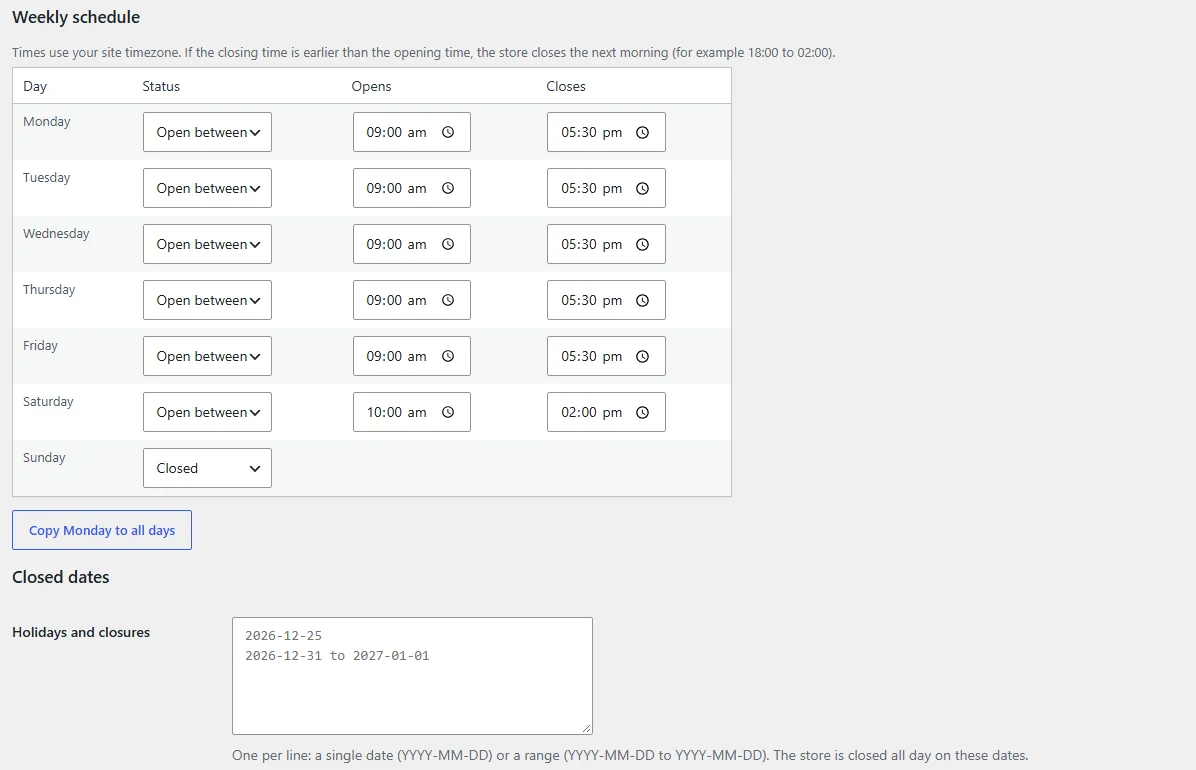
A bakery sets this weekly schedule and two holiday closures:
| Day | Status | Hours |
|---|---|---|
| Monday to Friday | Open between | 9:00 am to 5:30 pm |
| Saturday | Open between | 10:00 am to 2:00 pm |
| Sunday | Closed | None |
| 25 December, and 31 December to 1 January | Holidays and closures | Closed all day |
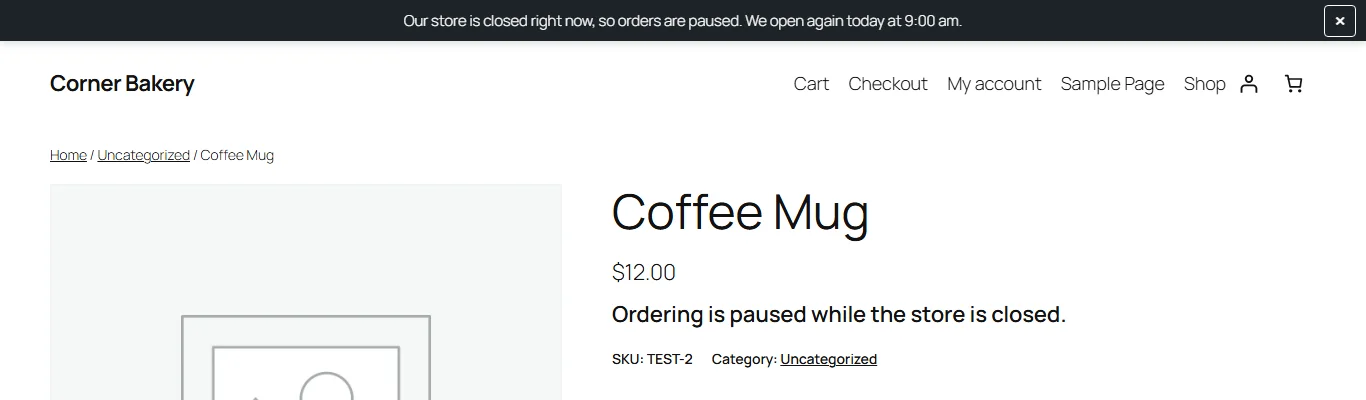
- A customer visits on Saturday at 3:00 pm. The store closed at 2:00 pm, so the Add to cart button is replaced by “Ordering is paused while the store is closed.” and the notice bar tells them you open again on Monday at 9:00 am.
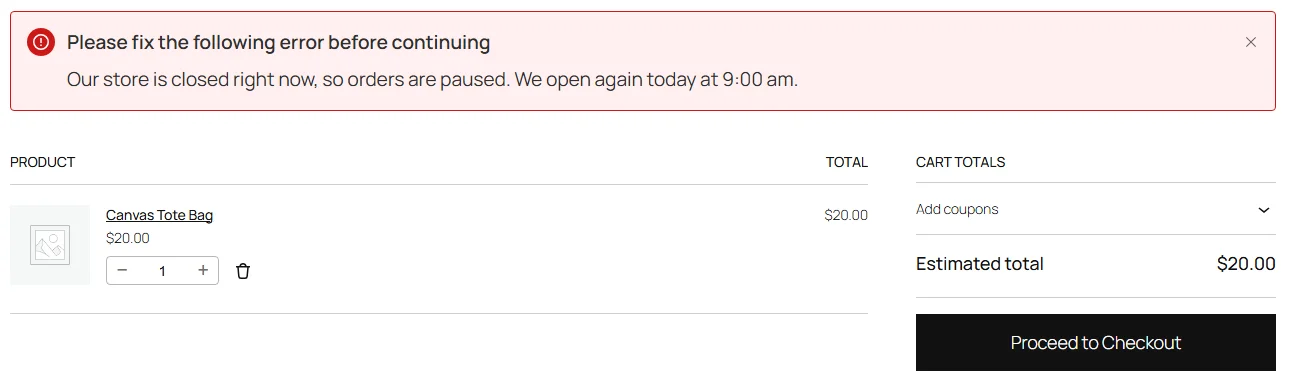
- Items already in their cart stay there. If they go to checkout, it is blocked with your closed message, in both the classic and the block checkout.
- On Monday at 9:00 am everything switches back on by itself. On 25 December the store stays closed all day, whatever the weekly schedule says.
A late-night takeaway can set Friday to open between 6:00 pm and 2:00 am: a closing time earlier than the opening time runs past midnight, so the store takes orders from Friday evening until 2:00 am on Saturday. Hours follow the timezone in Settings > General, including daylight saving time.
How to set up store hours in WooCommerce
- Install and activate WooCommerce, then install Codiffy Store Hours from Plugins > Add New (search for “Codiffy Store Hours”).
- Go to WooCommerce > Store Hours. The top of the screen shows whether the store is open right now and the current site time.
- Set each day to Open all day, Open between two times, or Closed. “Copy Monday to all days” fills in the week in one click.
- Add any holiday dates, one per line: a single date or a range.
- Write your closed message (or keep the default), choose where the notice shows, and save.
Until you change the schedule, every day is set to Open all day, so activating the plugin never closes your store by surprise. Shop managers can change the hours; no administrator access is needed. If the times look an hour out, choose a city in Settings > General > Timezone instead of a UTC offset, so daylight saving time is handled for you.
Show your hours on any page
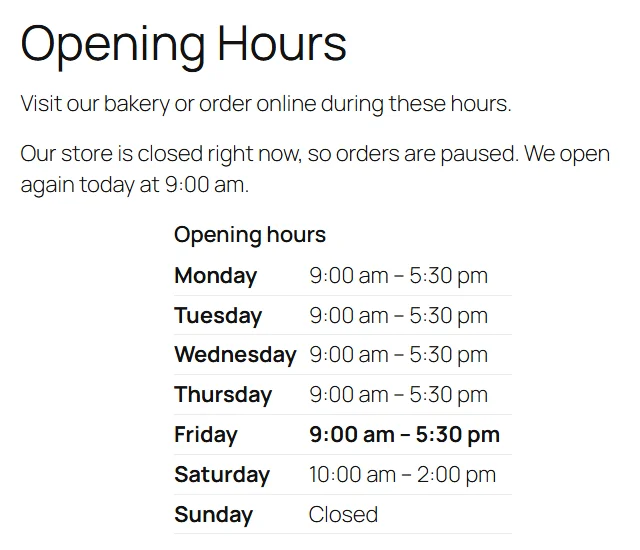
[codiffy_store_hours]shows your weekly opening hours as a table.[codiffy_store_status]shows only the current open or closed message.- In the notice,
{next_open}shows when you open again and{today_hours}shows today’s hours. You can also show a notice while the store is open, for example with today’s hours.
A free plugin, with no premium version
Codiffy Store Hours is completely free under the GPLv2 or later license, with no premium tier and no upsells. It is a rewrite of Codiffy’s own in-house “Open Close Store” plugin. It works with the classic and block cart and checkout, the WooCommerce Store API and AJAX add to cart, block and classic themes, and HPOS order storage. It passed Plugin Check with no errors or warnings and an independent security review, contacts no external service, tracks nobody, and loads its notice files only when the notice is shown.
For developers
The filter codiffy_store_hours_is_open lets you override the open or closed decision, for example for a custom rule.
Need something it doesn’t do?
Codiffy builds and changes WordPress and WooCommerce plugins to order, from a delivery-slot rule to a full custom checkout. Book a free call and get a fixed price before any work starts. More free plugins from us: Tiered Pricing for WooCommerce and Table Rate Shipping for WooCommerce.
Compatibility
- RequiresWordPress 6.5, WooCommerce 8.0 and PHP 7.4 or newer
- Tested up toWordPress 7.1 and WooCommerce 11.2
- LicenseGPLv2 or later, free
- Version1.0.0, released 14 October 2026
Compatibility is what the WordPress.org listing states. Running a newer WordPress or WooCommerce version? Ask us before you install and we will tell you honestly whether it has been checked.
Questions about Codiffy Store Hours for WooCommerce.
Can customers still see my products while the store is closed?
Yes. Your shop stays visible. Only adding to the cart and checking out are paused.
What happens to items already in a customer’s cart?
They stay in the cart. The customer simply can't check out until the store opens again.
Can I stay open past midnight?
Yes. Choose Open between and set a closing time earlier than the opening time, for example 6:00 PM to 2:00 AM.
Does it work with the block cart and checkout?
Yes. Checkout is paused in both the classic and the block-based cart and checkout while the store is closed.
Does the plugin send any data to other websites?
No. It contacts no external service and doesn't track visitors. The notice's dismiss button remembers its state in the visitor's browser only.
My hours are an hour out. Why?
The plugin uses the timezone in Settings > General > Timezone. Choose a city, for example New York, rather than a UTC offset so daylight saving time is handled automatically. The settings screen shows the current site time to help you check.
How do I show my opening hours on a page?
Add the shortcode [codiffy_store_hours] to any page, post or widget. Use [codiffy_store_status] to show only the current open or closed message.
What is removed when I delete the plugin?
By default your settings are kept, so you can reinstall without losing your schedule. Tick Delete these settings when the plugin is deleted on the settings screen to remove them.
More plugins
Plugin store
Ready-made plugins for WordPress and WooCommerce, built and supported by the Codiffy team.
-
WooCommerce plugin
WooCommerce Price Based On Country
Show different product prices to shoppers depending on their country.
$19View plugin -
WooCommerce plugin
WooCommerce Custom Buy Button
Change what the buy button says and where it sends your customers.
$19View plugin -
WooCommerce plugin
WooCommerce Bulk Edit Product Prices
Update prices across many products at once instead of one by one.
$19View plugin -
WooCommerce plugin
WooCommerce Product Bundle Table
Present bundled products in a clean table shoppers can buy from.
$29View plugin -
WooCommerce plugin
WooCommerce Conditional Shipping & Payment Methods
Show or hide shipping and payment options based on conditions you set.
$19View plugin -
WordPress plugin
Google reCAPTCHA for WordPress & WooCommerce
Protect your forms, login and checkout from spam and bots.
$19View plugin -
WordPress plugin
Approve New User Registration
Review and approve new WordPress and WooCommerce accounts before they go live.
$15View plugin -
Free WooCommerce plugin
Store Hours for WooCommerce
Take orders only when you're open: daily hours, holidays and a one-click close, free on WordPress.org.
FreeView plugin -
Free WooCommerce plugin
Table Rate Shipping for WooCommerce
Shipping prices from your own table: by weight, cart total, items, size or shipping class, per zone. Free.
FreeView plugin -
Free WooCommerce plugin
Tiered Pricing for WooCommerce
Quantity discounts and a bulk pricing table per product, variation or category, free on WordPress.org.
FreeView plugin
Need it to do something else?
We build and change WordPress and WooCommerce plugins to order. Book a free 30-minute call and leave with a fixed quote.
Prefer we call you? Request a callback