

Free Table Rate Shipping Plugin for WooCommerce
Codiffy Table Rate Shipping is a free table rate shipping plugin for WooCommerce: you set shipping prices from your own table of rates, by weight, cart total, number of items, size or shipping class, for each shipping zone. It is for stores whose couriers charge by weight or parcel size, and for shops that want free shipping over an amount or extra fees for bulky items.
FreeDirect download, GPLv2 or later
- Free ZIP download from codiffy.com
- Awaiting review on WordPress.org
- Built and supported by Codiffy
- For WordPress with WooCommerce
What it does
Works with shipping zones
Add the method to any zone (by country, state or postcode), even several times in one zone
Four ways to calculate
Per order, per item, per line item or per shipping class
13 conditions
Subtotal, quantity, weight, length, width, height, surface area, volume, shipping class, product, category, date range and day of week
Costs you can combine
Flat amount, percentage of subtotal, amount multiplied by weight, size or items, and amount for every X kg, items or currency
Several options from one table
Give rows titles like Standard and Express and customers choose at checkout
Free-shipping counter
A description under each option, for example "Spend $36.00 more for free shipping"
Shipping class rules
Add up every class, charge one class by priority, or only the highest or lowest costing class
Block and classic checkout
Works with both cart and checkout types and with HPOS order storage
Table rate shipping means your shipping price comes from a table you write, not from one flat fee. Codiffy Table Rate Shipping, a free table rate shipping plugin for WooCommerce, adds a shipping method called Codiffy Table Rate to your shipping zones. Each row of its table says when it applies (its conditions, such as “weight up to 5 lb” or “subtotal $100 or more”) and what it costs. At the cart and checkout the rows are checked from top to bottom, and the first row whose conditions all match sets the price.
How table rate shipping works: a worked example
Here is a table for a store that ships within the United States, set to calculate per order. Amounts are in your store’s currency and weights in your store’s weight unit.
| Row | Option title | Conditions | Costs |
|---|---|---|---|
| 1 | Free shipping | Subtotal from 100 | Flat $0, and hide the method’s other options when this row applies |
| 2 | Standard | Weight up to 5 lb | Flat $6.95 |
| 3 | Standard | Weight from 5 to 20 lb | Flat $11.95 |
| 4 | Standard | Weight from 20 lb | Flat $1.95 + $0.50 for every 1 lb |
| 5 | Express | None, so it always applies | Flat $14.95 + $2.00 multiplied by items |
The Standard rows have the description “3 to 5 business days. Spend {free-shipping@100} more for free shipping.” A customer orders 3 items that weigh 7 lb, with a subtotal of $64:
- Row 1 does not match, because the subtotal is under $100.
- Row 2 does not match, because 7 lb is over 5 lb.
- Row 3 matches, so Standard costs $11.95 and its description reads “Spend $36.00 more for free shipping.”
- Row 5 matches, so Express costs $14.95 + 3 × $2.00 = $20.95.
The customer chooses between Standard at $11.95 and Express at $20.95. If they add more to the cart and the subtotal reaches $100, row 1 matches and Free shipping at $0 is the only option of this method, because row 1 hides the others. Row 4 charges $11.95 plus $0.50 for each pound over 20: “for every” counts the whole weight, rounded up, so a 30 lb order costs $1.95 + 30 × $0.50 = $16.95.
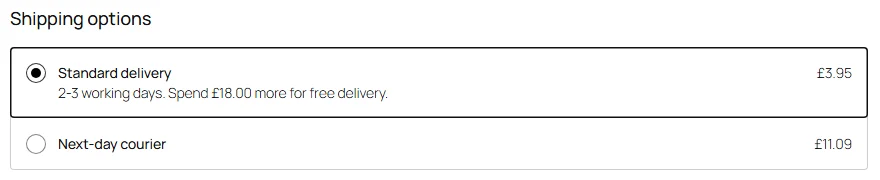
WooCommerce shipping by weight, items, cart total or destination
- By weight: one row per weight band, as in rows 2 to 4 above. Turn on dimensional weight to charge large, light parcels by their volume (couriers commonly use a factor of 139 for inches and pounds, or 5000 for centimeters and kilograms).
- By number of items: a Quantity condition for bands (“1 to 3 items: $5”), or the cost “Amount multiplied by items” for a price per item.
- By cart total: a Subtotal condition. Choose whether the subtotal includes tax and whether it is worked out after coupons.
- By destination: WooCommerce shipping zones decide where a customer is, by country, state or ZIP code. Add the method to each zone with its own table, for example higher rates for Alaska and Hawaii or for Canada. A customer sees the table of the zone their address falls in.
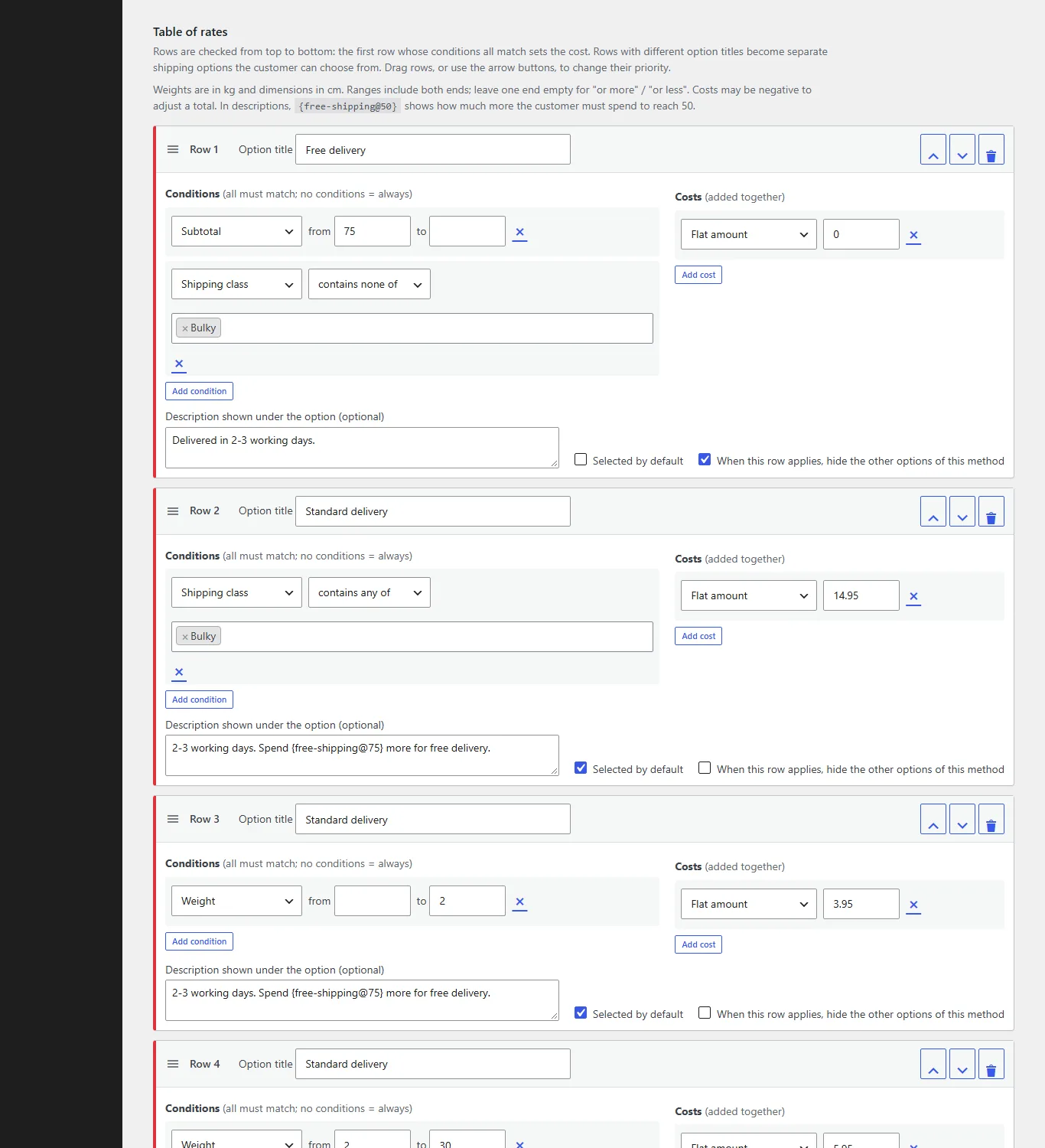
- By product type: Shipping class, Product or Category conditions, for example $14.95 when the cart contains anything in a “Bulky” class.
- By date: a Date range or Day of week condition for seasonal or weekend rates.
Calculating per item, per line item or per shipping class splits the cart into groups first. Each group is matched against the table on its own and the costs are added up, or, per shipping class, you can charge only the highest priority class, or only the highest or lowest costing class.
How to set up table rate shipping in WooCommerce
- Make sure WooCommerce 9.2 or newer is active, then upload the plugin ZIP under Plugins > Add New > Upload Plugin and activate it.
- Go to WooCommerce > Settings > Shipping, open a shipping zone and click Add shipping method.
- Choose Codiffy Table Rate, then click Edit next to it. Its settings open on their own page.
- Choose how rates are calculated, then add rows to the Table of rates: conditions on the left, costs on the right. Drag rows, or use the arrow buttons, to change their order.
- Save. Customers in that zone now see the option and the price of the first matching row.
Activating the plugin changes nothing on its own: your shipping only changes once you add the method to a zone. If no row matches a cart, for example an order that is too heavy, that option is not offered, which is how you stop orders you cannot ship.
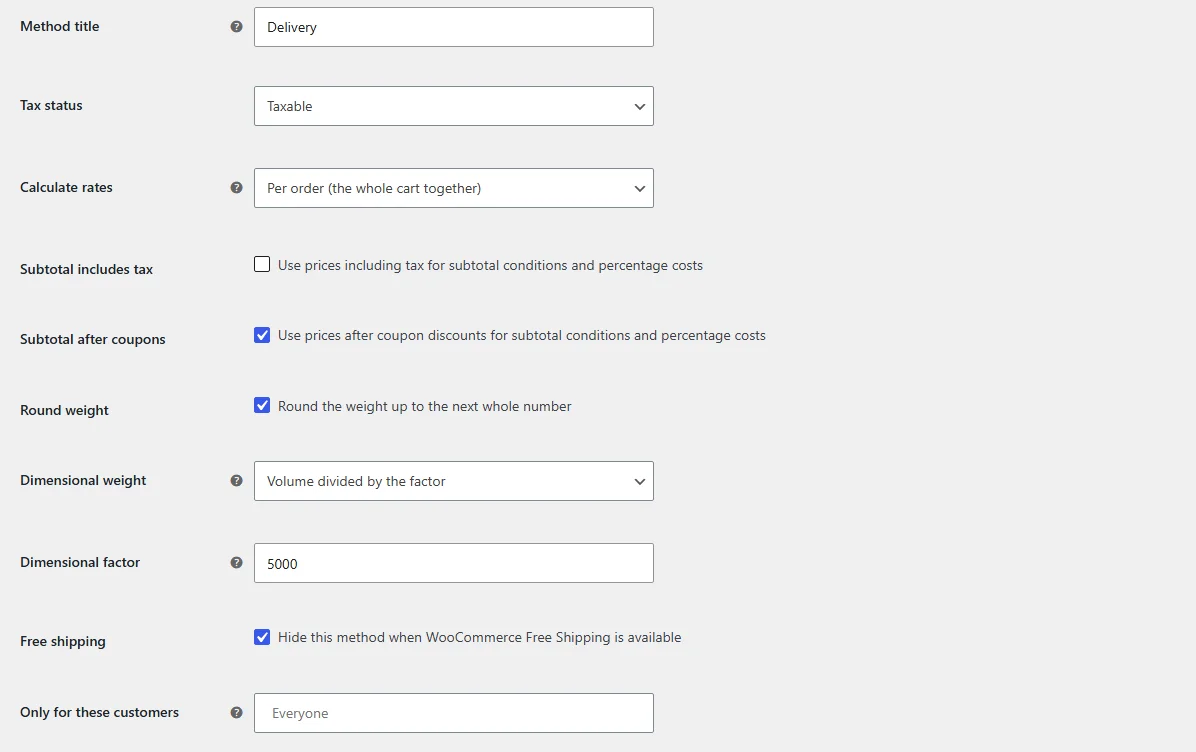
Settings for tax, coupons, weight and customers
Each copy of the method has its own settings: the title customers see, tax status, how rates are calculated, whether the subtotal includes tax or comes after coupons, rounding the weight up to a whole number, dimensional weight and its factor, hiding the method when WooCommerce Free Shipping is available, and limiting it to chosen customer roles or guests. Class priorities for “single class only” are set once under WooCommerce > Settings > Shipping > Codiffy Table Rate.
A free alternative to paid table rate shipping plugins
Table rate shipping is often sold as a paid add-on. Codiffy Table Rate Shipping is free under the GPLv2 or later license, with no premium version and no upsells, and it includes the rules most WooCommerce stores need to price shipping by weight, items, cart total, size, shipping class and destination.
| Feature | Codiffy Table Rate Shipping |
|---|---|
| Per order, per item, per line item or per shipping class | Included |
| Per class: add up every class, highest priority class only, or highest or lowest costing class | Included |
| WooCommerce shipping zones, several copies per zone | Included |
| 13 conditions, several per row: subtotal, quantity, weight, height, width, length, surface area, volume, shipping class, product, category, date range, day of week | Included |
| Costs combined in one row: flat amount, percentage of subtotal, amount multiplied by a measure, amount for every X | Included |
| Drag and drop row priority (with keyboard arrow buttons), tax per method, limit by customer role including guests | Included |
| Dimensional weight, subtotal with tax or after coupons, round weight up | Included |
| Hide when WooCommerce Free Shipping is available | Included |
| Option descriptions with a “spend X more for free shipping” counter | Included |
| Default option, and hide the other options when a row applies | Included |
| Several named options (Standard, Express) from one table | Included |
| Negative costs to adjust a total | Included |
| Block and classic cart and checkout, HPOS order storage | Included |
| A full user guide | Included |
What it doesn’t do yet
These are not in version 1.0.0:
- CSV import and export of rates
- Separate rate tables managed by other users
- Coupon, time of day and Dokan vendor conditions
- Handling fees and a “deny” cost type
- Option descriptions on order emails and order pages
- Rates by city name, and minimum and maximum price limits
- Not yet tested with WPML.
Need one of these for your store? We build custom shipping rules to order. Book a free call and get a fixed price before any work starts.
Download the free plugin
Codiffy submitted the plugin to the WordPress.org plugin directory on 20 October 2026, and it is awaiting review there. Until it is listed, download version 1.0.0 here, the same package that was submitted: fill in the short form and the download starts straight away. Once it is listed, WordPress offers its updates on the Plugins screen like any plugin from the directory.
Thank you, and welcome. Your download has started.
If it does not start, download the ZIP here (the link works for 24 hours). To install it, go to Plugins > Add New > Upload Plugin in WordPress.
It has passed Plugin Check with no errors or warnings and an independent security review. It contacts no external service, tracks nobody and loads nothing on your storefront.
Need a custom shipping rule? We build it
Codiffy builds and changes WordPress and WooCommerce plugins to order, from a delivery-slot rule or a courier rate lookup to a full custom checkout. Book a free call and get a fixed price before any work starts. More free plugins from us: Tiered Pricing for WooCommerce and Store Hours for WooCommerce.
Compatibility
- RequiresWordPress 6.5, WooCommerce 9.2 and PHP 7.4 or newer
- Tested up toWordPress 7.1, WooCommerce 11.2 and PHP 8.3
- LicenseGPLv2 or later, free
- Version1.0.0, released 15 October 2026
Compatibility is what the plugin's readme states. Running a newer WordPress or WooCommerce version? Ask us before you install and we will tell you honestly whether it has been checked.
Questions about Codiffy Table Rate Shipping for WooCommerce.
Is Codiffy Table Rate Shipping really free?
Yes. It is free under the GPLv2 or later license. There is no license key to enter, and it does not contact any outside service.
How do I charge shipping by weight in WooCommerce?
Add one row per weight band with a Weight condition, for example up to 5 lb, 5 to 20 lb and from 20 lb, each with its own cost. For a price per pound, use the cost type Amount for every with a step of 1.
In which order are rows checked?
From top to bottom. For each shipping option, the first row whose conditions all match sets the cost, so put your most specific rows at the top.
What happens when no row matches the cart?
That option is not offered. If no option of the method matches, the method shows nothing, which is how you stop orders that are too heavy or too large to ship.
Can I offer Standard and Express from one table?
Yes. Give some rows the option title Standard and others Express. Each title becomes its own shipping option, and you choose which one is selected by default.
Can I import my rates from a CSV file?
Not yet. Rates are added in the table editor, where rows can be dragged into order. If you have a long rate sheet, book a free call and we can help you move it in.
Does it work with the block cart and checkout?
Yes. Options, prices and descriptions appear in both the block and the classic cart and checkout, and it works with HPOS order storage.
Does the plugin send any data to other websites?
No. It does not contact any external service, does not track anyone and loads nothing on your storefront.
Is this a free alternative to paid table rate shipping plugins?
Yes. Codiffy Table Rate Shipping is free under the GPLv2 or later license, with no premium version. It covers shipping by weight, item count, cart total, size, shipping class, product, category and date, per zone, in the classic and block checkout.
More plugins
Plugin store
Ready-made plugins for WordPress and WooCommerce, built and supported by the Codiffy team.
-
WooCommerce plugin
WooCommerce Price Based On Country
Show different product prices to shoppers depending on their country.
$19View plugin -
WooCommerce plugin
WooCommerce Custom Buy Button
Change what the buy button says and where it sends your customers.
$19View plugin -
WooCommerce plugin
WooCommerce Bulk Edit Product Prices
Update prices across many products at once instead of one by one.
$19View plugin -
WooCommerce plugin
WooCommerce Product Bundle Table
Present bundled products in a clean table shoppers can buy from.
$29View plugin -
WooCommerce plugin
WooCommerce Conditional Shipping & Payment Methods
Show or hide shipping and payment options based on conditions you set.
$19View plugin -
WordPress plugin
Google reCAPTCHA for WordPress & WooCommerce
Protect your forms, login and checkout from spam and bots.
$19View plugin -
WordPress plugin
Approve New User Registration
Review and approve new WordPress and WooCommerce accounts before they go live.
$15View plugin -
Free WooCommerce plugin
Store Hours for WooCommerce
Take orders only when you're open: daily hours, holidays and a one-click close, free on WordPress.org.
FreeView plugin -
Free WooCommerce plugin
Table Rate Shipping for WooCommerce
Shipping prices from your own table: by weight, cart total, items, size or shipping class, per zone. Free.
FreeView plugin -
Free WooCommerce plugin
Tiered Pricing for WooCommerce
Quantity discounts and a bulk pricing table per product, variation or category, free on WordPress.org.
FreeView plugin
Need it to do something else?
We build and change WordPress and WooCommerce plugins to order. Book a free 30-minute call and leave with a fixed quote.
Prefer we call you? Request a callback